
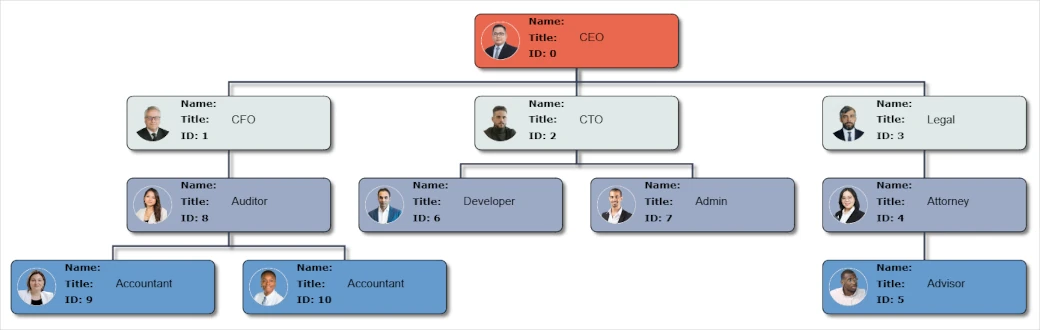
MindFusion's Org Chart Plugin provides a powerful and intuitive way to create and customize organizational charts and other hierarchies directly within your WordPress posts and pages.
Allow users to create, modify, and delete nodes directly on the chart with intuitive right-click menus and in-place editing.
Easily restructure your org chart by dragging and dropping nodes to new parent nodes.
Load existing org chart data from JSON files and export your charts for backup or use in other applications.
Set the width and height of the org chart to perfectly fit the layout of your WordPress page or post.
Quickly find any node in the chart with the built-in search functionality and print your charts for offline use (Premium feature).
Hide employee details to guard privacy while still allowing website visitors to explore the hierarchy.
Setting up your first org chart takes only a minute and is as easy as 1, 2...3.

Download the plugin file. In your WordPress dashboard, navigate to Plugins -> Add New, and upload the downloaded ZIP file.
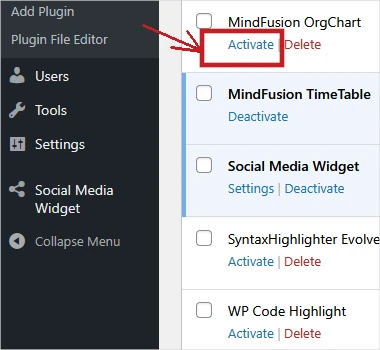
Go to the Installed Plugins sub-menu and activate the plugin.
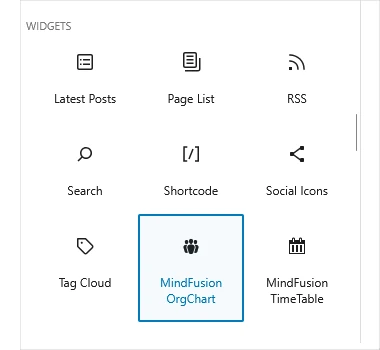
In the WordPress editor, click the "+" sign, find the "MindFusion Org Chart" block in the "Widgets" section, drag and drop it to your page or post.
The core Org Chart plugin is free to use and includes all the features you need to get started. The free version has a limit on the number of nodes and includes a link-back.
For more advanced use cases, the Premium version offers: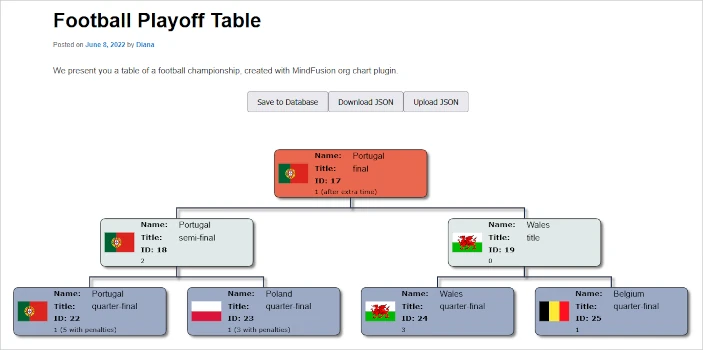
For over two decades, MindFusion has been a leader in creating feature-rich, high-performance software components for developers worldwide. Our expertise spans a wide range of tools, from diagramming and charting to scheduling and reporting. We are committed to providing robust, reliable, and well-documented solutions that empower our users to build exceptional applications. The MindFusion TimeTable plugin for WordPress is our latest step in bringing powerful scheduling tools to an even wider audience.


