Building a High-Performance Operations Dashboard with MindFusion Pack for JavaScript

In this blog post we will create a product inventory and customer satisfaction dashboard in pure JavaScript with a data grid that spans over 10 000 rows and includes real-time bar chart and a KPI gauge. The data is generated dynamically. Here is the ready dashboard:
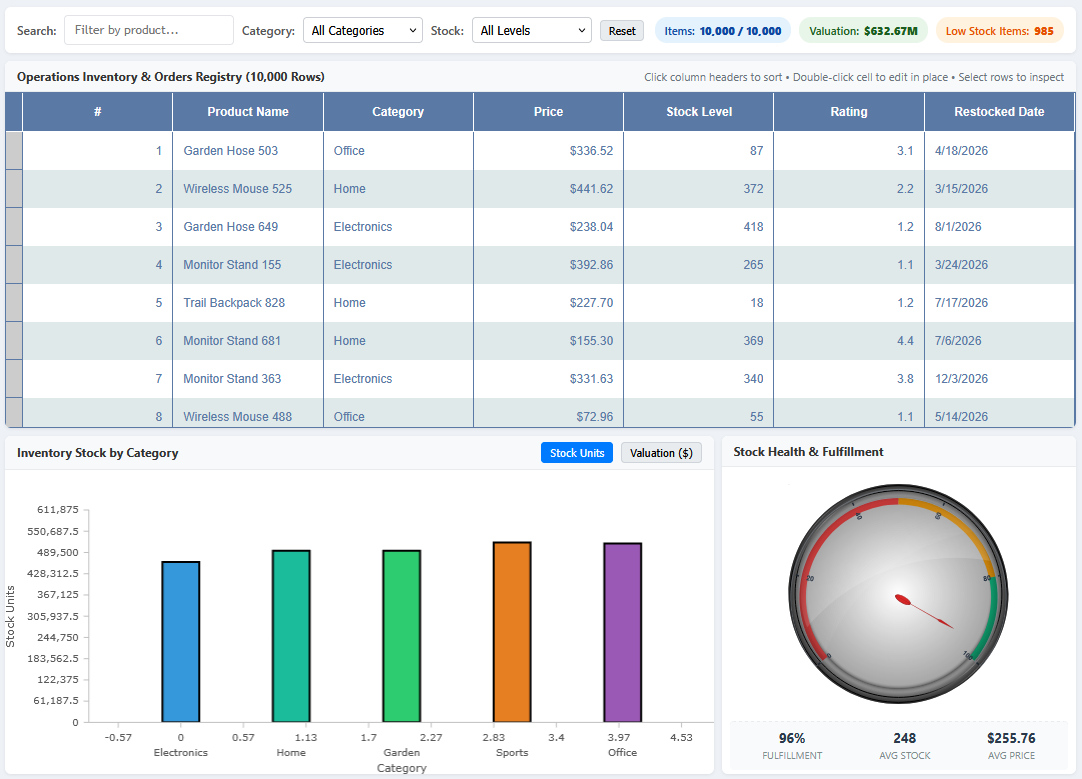
Our sample features the following components:

  1. MindFusion.DataViews (Grid): provides virtualized DOM rendering that handles 10,000 live rows with sorting, instant filtering, and inline editing.
  2. MindFusion.Charting: used to create an interactive bar chart that displays inventory stock units and financial valuation grouped by category.
  3. MindFusion.Gauges: the OvalGauge is customized to render a circular meter that indicas operational fulfillment rate with color-code zones according to stock availability.
  4. Dynamic Client-Side Dataset: A lightweight pseudo-random data generator producing 10,000 consistent records in ~18ms with no backend server required.

The full source code for this sample is available on Mindfusion JavaScript GitHub Repository: https://github.com/MindFusionComponents/JavaScript-Dashboard-Samples
Continue reading →

Mastering “Mission Control”: Building a High-Density Resource View in Java Swing

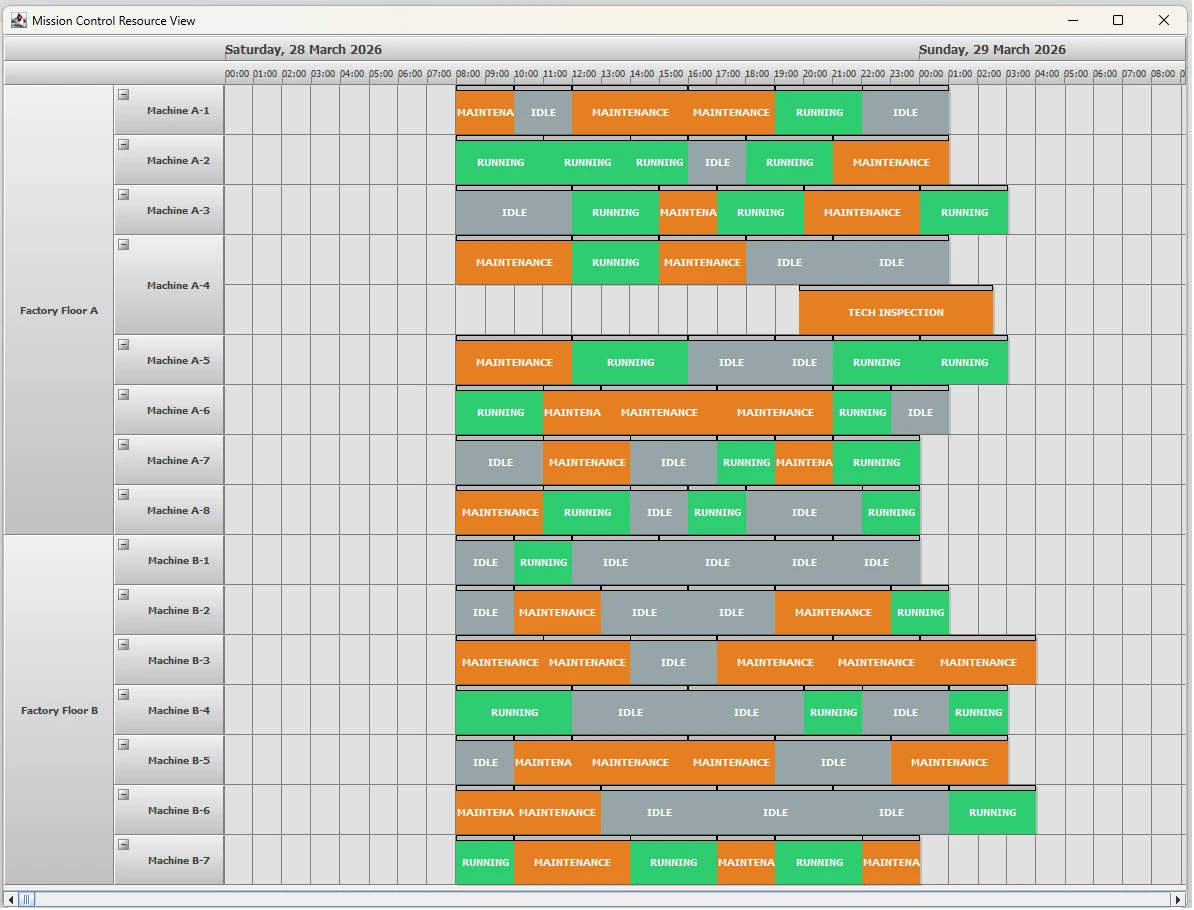
In enterprise environments like Manufacturing Execution Systems (MES) and Fleet Management, the “Mission Control” dashboard is the holy grail. It provides the ability to visualize hundreds of resources—machines, personnel, or vehicles—across a multi-day timeline while maintaining a clean, hierarchical structure.

In this post, we’ll explore how to use MindFusion Scheduling for Java Swing to create an enterprise-grade resource manager.

enterprise resource planning for multiple assets

The Challenge: Visualizing High-Volume Data

Enterprise applications often struggle with visual clutter. Users need to see the “big picture” (e.g., Factory Floor uptime) while retaining the ability to drill down into specifics (e.g., individual Machine maintenance).

The Feature: The “Mission Control” Resource View

Our “Mission Control” demo highlights several valued enterprise features:

  • Expandable/Collapsible Rows: Handle hundreds of resources by grouping them into logical departments or zones.
  • Hierarchical Grouped Headers: Visualize parent-child relationships (Factory Floor -> Machine) with distinct branding.
  • Color-Coded Status Blocks: Instant visual recognition of “Running” (Green), “Maintenance” (Orange), and “Idle” (Gray) states.

Continue reading →

Creating an Interactive Engineering Diagram App in JavaScript

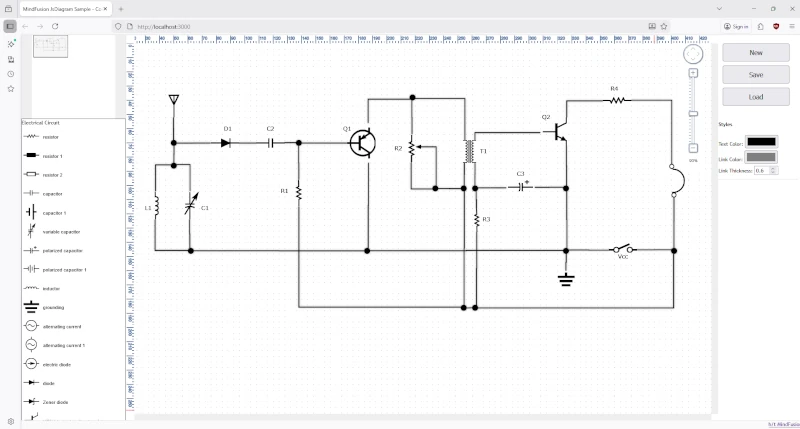
In this post, we’ll walk through the process of building a web-based electrical diagram application. This tool allows users to create, modify, and save circuit and home appliance diagrams. We’ll use the.Diagramming for JavaScript, and its ability to support SVG images in modes, various arrow head shapes on links, save and load of flowcharts to/from various formats.

The final application will feature:

  • A diagram view that supports pan and zoom.
  • A palette of pre-defined SVG nodes representing various engineering components, separated into logical sections.
  • The ability to save the current diagram to a JSON file and load it back.
  • Real-time style customization for text, links, and more.
A circuit schema created with MindFusion Diagramming library for JavaScript

Continue reading →

Getting Started: Building Interactive JavaScript Diagrams with MindFusion

In this article we look at the steps required to build this minimal JavaScript diagramming application:

The application uses MindFusion JavaScript Diagram library and allows the user to create various flowchart shapes with drag and drop, customize their color and edit text. Users can create links and specify whether links have arrowheads. Once ready, they can save the current diagram and load it when needed.

Continue reading →