Getting Started: Building Interactive JavaScript Diagrams with MindFusion

In this article we look at the steps required to build this minimal JavaScript diagramming application:

The application uses MindFusion JavaScript Diagram library and allows the user to create various flowchart shapes with drag and drop, customize their color and edit text. Users can create links and specify whether links have arrowheads. Once ready, they can save the current diagram and load it when needed.

Continue reading
Building a Custom-Styled WPF Virtual Keyboard: A How-To Guide

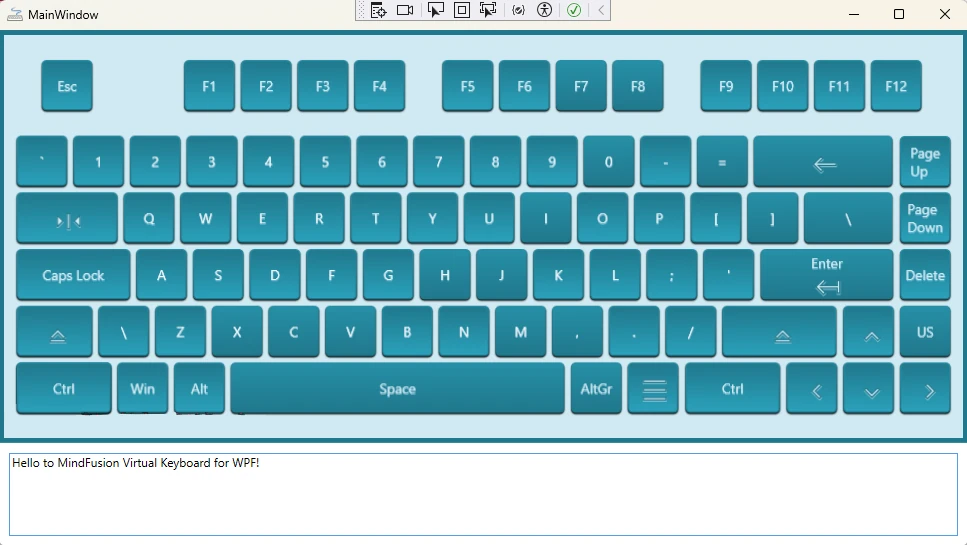
Creating a custom user interface often requires tailoring components to fit your application’s specific design language. In this guide, we’ll walk you through how to build and style a WPF virtual keyboard from the ground up, using the powerful MindFusion’s WPF Virtual Keyboard component. The result will be a beautiful, resizable keyboard with custom icons, animations, and a clean, maintainable structure.

A custom virtual keyboard embedded in a WPF application

Continue reading

Building a Fishbone Diagram from Scratch in JavaScript

The Fishbone or Ishikawa diagram is a powerful tool for cause-and-effect analysis. While users can build them manually using a diagram editor, it’s often more efficient to generate them programmatically from a predefined data set. This article walks through the process of creating a complete fishbone diagram from scratch using JavaScript and the MindFusion.Diagramming API.

A fishbone or Ishikawa diagram built with the MindFusion JavaScript diagram library

Continue reading

Building ListView-like TableNode-s with Blazor Diagram

In this blog post we look how you can create TableNode that render their cells following the logic of a list view: the tables have as many table columns and rows as needed in order to fit their content. The width of each column is fixed. When necessary, tables can be scrolled vertically. This is the final result:

TableNodes in Blazor

Continue reading