
In this blog post we will create a product inventory and customer satisfaction dashboard in pure JavaScript with a data grid that spans over 10 000 rows and includes real-time bar chart and a KPI gauge. The data is generated dynamically. Here is the ready dashboard:
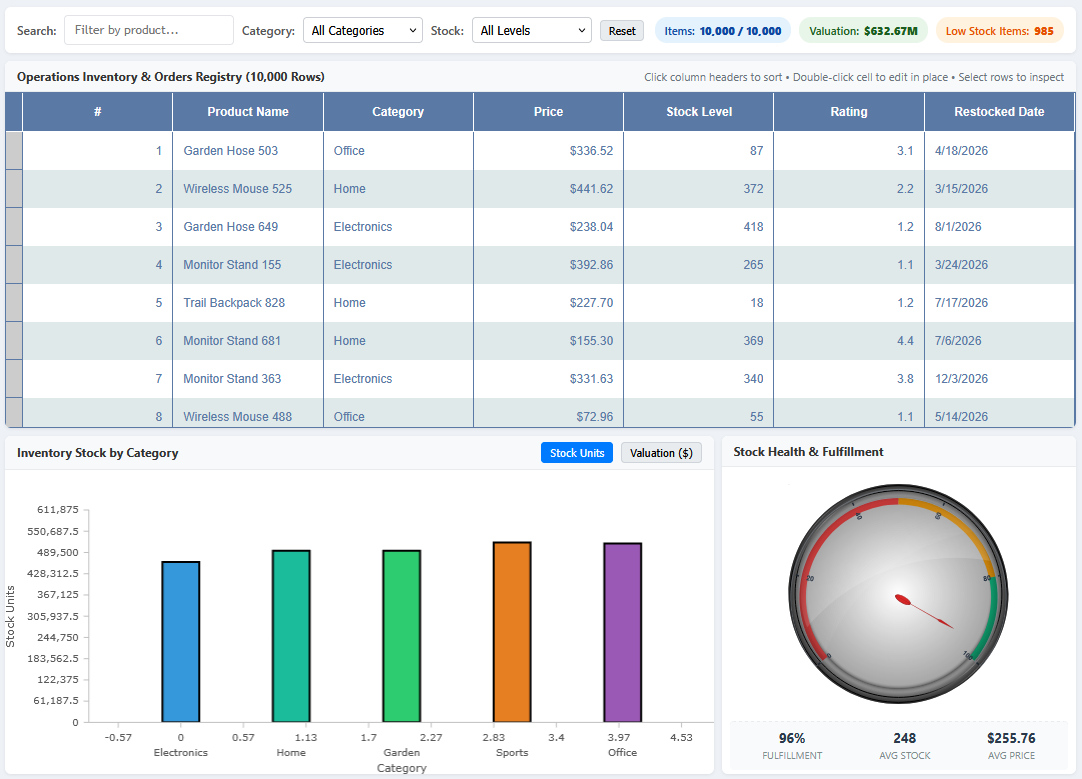
Our sample features the following components:
- MindFusion.DataViews (Grid): provides virtualized DOM rendering that handles 10,000 live rows with sorting, instant filtering, and inline editing.
- MindFusion.Charting: used to create an interactive bar chart that displays inventory stock units and financial valuation grouped by category.
- MindFusion.Gauges: the OvalGauge is customized to render a circular meter that indicas operational fulfillment rate with color-code zones according to stock availability.
- Dynamic Client-Side Dataset: A lightweight pseudo-random data generator producing 10,000 consistent records in ~18ms with no backend server required.
The full source code for this sample is available on Mindfusion JavaScript GitHub Repository: https://github.com/MindFusionComponents/JavaScript-Dashboard-Samples


