Mastering “Mission Control”: Building a High-Density Resource View in Java Swing

In enterprise environments like Manufacturing Execution Systems (MES) and Fleet Management, the “Mission Control” dashboard is the holy grail. It provides the ability to visualize hundreds of resources—machines, personnel, or vehicles—across a multi-day timeline while maintaining a clean, hierarchical structure.

In this post, we’ll explore how to use MindFusion Scheduling for Java Swing to create an enterprise-grade resource manager.
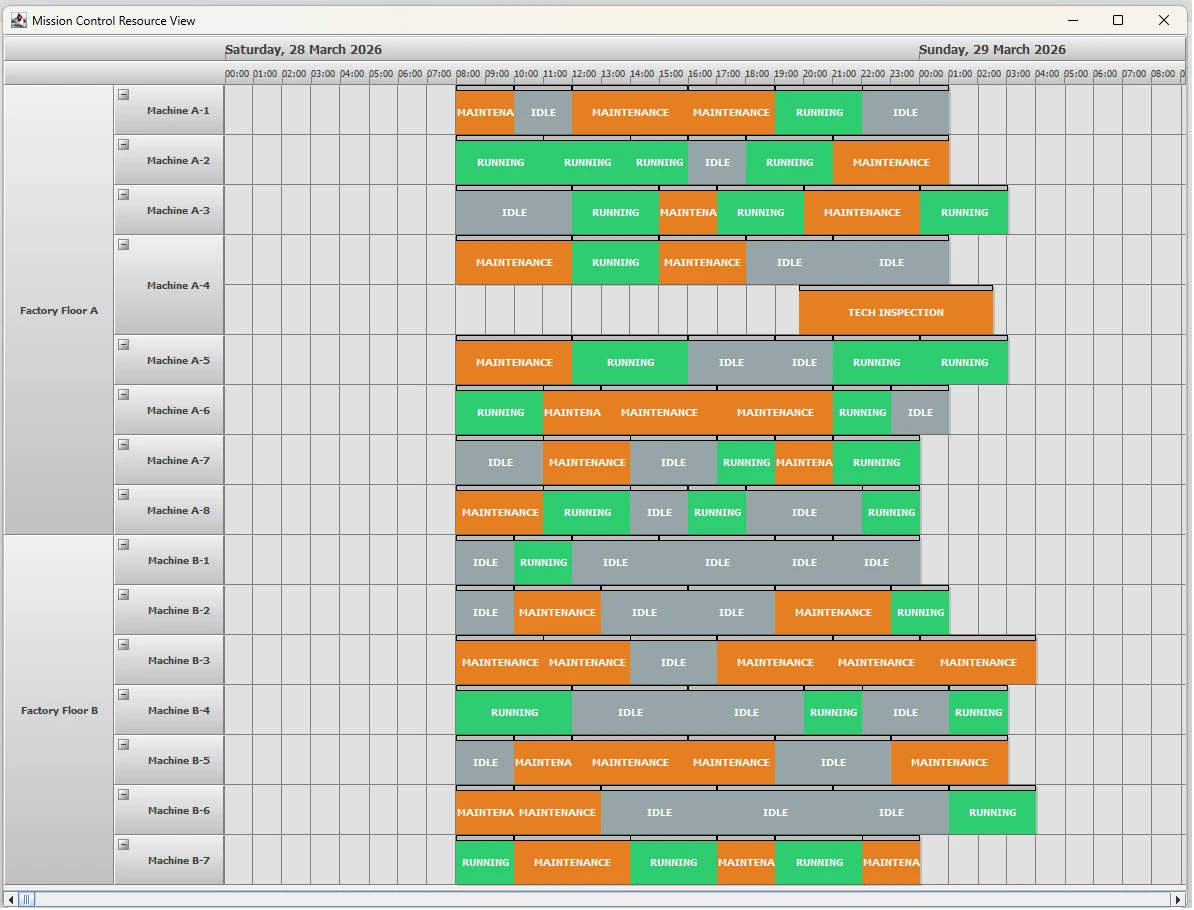
enterprise resource planning for multiple assets

The Challenge: Visualizing High-Volume Data

Enterprise applications often struggle with visual clutter. Users need to see the “big picture” (e.g., Factory Floor uptime) while retaining the ability to drill down into specifics (e.g., individual Machine maintenance).

The Feature: The “Mission Control” Resource View

Our “Mission Control” demo highlights several valued enterprise features:

  • Expandable/Collapsible Rows: Handle hundreds of resources by grouping them into logical departments or zones.
  • Hierarchical Grouped Headers: Visualize parent-child relationships (Factory Floor -> Machine) with distinct branding.
  • Color-Coded Status Blocks: Instant visual recognition of “Running” (Green), “Maintenance” (Orange), and “Idle” (Gray) states.

Continue reading

Two Ways to Load A MindFusion Java Swing Library From Maven In a NetBeans Project

In this blog post we will look at two ways to load the Scheduling library for Java Swing from Maven using Apache NetBeans IDE. In our previous blog post we looked at how to add the library from a local *.jar file. Now we will load it interactively from Maven. MindFusion’s repositories on Maven can be found at https://search.maven.org/search?q=mindfusion.

In the sections below we will look on how to load the Scheduling library from Maven and use it in a:

  • Maven project
  • Gradle project

We test that the scheduling library was successfully loaded by showing a simple calendar:

Continue reading

3 Ways to Add a Local JPlanner.jar to Your Project in Apache NetBeans

In this blog post we will look at 3 different ways to add the JPlanner.jar library to your project in the NetBeans IDE. The projects are:

  • Java Application with Maven
  • Java Application wtih Gradle
  • Java Appliation with Ant

We assume you have downloaded the JPlanner.jar either with the trial version of Scheduling for Java Swing or with one of the samples.

I. Java Application with Maven

Right click on the “Dependencies” node in your project tree and choose “Add Dependency”:


Continue reading

Running JPlanner Samples with Apache NetBeans IDE

In this blog post we will show you how to open the sample projects that come with the MindFusion Scheduling library for Java Swing with Apache NetBeans IDE.

The samples for MindFusion JPlanner are available from two sources:

  • The download archive, which contains all samples in seperate folders. Each sample links to the planner *.jar file.
  • The samples page where the samples can be downloaded separately. Each sample contains the *.jar file of the scheduling library.

By default the sample folders cannot be opened as projects in NetBeans. You should import them with File -> Import Project -> Eclipse Project.

Continue reading