MindFusion.Spreadsheet for WinForms 1.0.1

MindFusion has released version 1.0.1 of its spreadsheet component. The new release has fixed various bugs and offers improved binary and XML serialization. We have made some major changes to the control and it is not backward compatible.

A spreadsheet created with MindFusion.Spreadsheet for WinForms

A spreadsheet created with MindFusion.Spreadsheet for WinForms

You can download the trial version from the link below:

MindFusion.Spreadsheet for WinForms 1.0.1

If you require technical support, you can post a message at the forum, send us an e-mail at support@mindfusion.dev. or use the help desk. MindFusion takes special effort in providing fast and detailed answers to all inquiries that we receive.

About MindFusion.Spreadsheet for WinForms: An easy-to-use programming component suitable for building all types of spreadsheets fast and easy. The tool supports formulas, tool-tips, cell annotations, cell spanning, scrolling and many more. You can add charts and images as well use the flexible style system to design the perfect spreadsheet. The component supports full undo and redo as well copy and paste from Windows clipboard. You can import spreadsheet data from CSV, XLSX or ODS files and export the final spreadsheet in a number of formats – as images, PDF or CSV files. Various auxiliary forms help you quickly adjust the data and appearance of your spreadsheet. Read more about the features of the component here or check the license prices at the buy page.

Spreadsheet for WinForms is part of MindFusion Pack for WinForms, which offers other useful components that are of great use when you build any type of WinForms application – from a diagramming library to map control to gauges: check them here.

Diagramming for JavaScript, V1.7.1

MindFusion has released a new version of its diagramming component for JavaScript. Here is an overview of the new features in Diagramming for JavaScript, V1.7.1:

Rounded links
If your links are with Polyline or Cascading Shape, they can be rendered with rounded joints between the segments. You need to call the new Diagram.setRoundedLinks(true) method to enable this. The radius of joint arcs is specified with the Diagram.setRoundedLinksRadius.

Arcs at links crossings.

Arcs at links crossings.

Link crossings
The component can now represent the crossing point of two links either as an arc (bridge) drawn for the link with the higher Z-index, or as a cut in the link with lower Z-index. Call the Diagram.setLinkCrossings() methods with either LinkCrossings.Arcs or LinkCrossings.Cut as an argument. The radius of crossing arcs is specified with Diagram.setCrossingRadius().

Miscellaneous

  • By node rotation, the links are now routed around the rotated node’s boundaries.
  • The new routeAllLinks pulls apart link segments that would overlap.
  • A set of new predefined node shapes are added to the Shapes class: RightTriangle, Decagon, Trapezoid, Star4Pointed, Star5Pointed, Star6Pointed, Star7Pointed, Star16Pointed, Star24Pointed, Star32Pointed, Donut and Plaque.
  • and much more – read the full list here.

The trial version of the new Diagramming for JavaScript release is available for direct download from the following link:

Download MindFusion.Diagramming for JavaScript Library 1.7.1

We have always taken special effort in providing quality technical support to all our clients and evaluators. You can write us at e-mail support@mindfusion.dev or use the help desk. You can use the JsDiagram section on MindFusion forum to post questions about the tool.

About Diagramming for JavaScript Library: Written 100% in JavaScript, this tool uses HTML5 Canvas to draw impressive diagrams, schemes, flowcharts, trees and many more. It is browser independent, easy to use and integrate into any web application. JsDiagram supports a variety of predefined node shapes, customizable links, rich event set and many appearance options. The user interaction model includes resizing / moving / selecting and modifying any diagram element.

The tool boasts an elegant API, which is documented in details as well numerous step-by-step guides and tutorials. Various samples are provided to let you learn quickly how to use the most important features of the library – check them here. JsDiagram is not only the perfect choice for creating any type of diagram in the browser – it can also arrange it the way you wish with a mouse click using one of its automatic graph layout algorithms. For more details about the features of the component, please visit the JsDiagram page.

Diagramming for Java, V4.0.4

MindFusion has released Diagramming for Java 4.0.4 Here is an overview of the new features:

Import of Visio 2013 files

You can use the new VisioImproter class to import *.vsdx files, created by Visio 2013. In order to use it, you must import the com.mindfusion.diagramming.importers namespace. The Import method has several overloads, which let you choose whether to import the diagram as a single Diagram whose content is merged from all imported pages or as a DiagramDocument whose pages correspond to the Visio pages. At this time VisioImporter supports the basic flowchart and data flow Visio stencils.

Import of OpenOffice Draw files

The new DrawImporter class can import .odg files, created by the OpenOffice Draw vector graphics editor. In order to use it, you must import the com.mindfusion.diagramming.importers namespace. DrawImporter supports shapes from the General and Flowchart shape palettes in Draw. You can choose among several overloads of the Import method to import the OpenOffice drawing into a DiagramDocument whose pages correspond to the Draw pages, or into a single Diagram whose content is merged from all imported pages.

Miscellaneous

  • The AutoSnapToNode property allows links to be snapped to nodes from a distance
  • Use the new RoundedLinks and RoundedLinksRadius properties to draw arcs at the joints of Cascading and Polyline links’ segments.
  • Several new shapes for better compatibility with Visio 2013 basic stencil were added: RightTriangle, Decagon, Trapezoid, Star4Pointed, Star5Pointed, Star6Pointed, Star7Pointed, Star16Pointed, Star24Pointed, Star32Pointed, Donut, Plaque.
The new predefined node shapes.

The new predefined node shapes.

Further details about the new release are posted at the JDiagram forum. You can download the control and test yourself its performance and functionality. Here is a direct link to the trial version:

Download MindFusion.Diagramming for Java Swing, V4.0.4

Technical support

MindFusion puts special effort in providing high quality technical support to all its clients and evaluators. You can post your questions about Diagramming for Java or any other of our components at the forum, help desk or at support@mindfusion.dev. All support inquiries are usually answered within hours of being received.

About Diagramming for Java Swing: MindFusion.Diagramming for Java Swing provides your Java application with all necessary functionality to create and customize a diagram. The library is very easy to integrate and program. There are numerous utility methods, rich event set, more than 80 predefined shapes. The tool supports a variety of ways to render or export the diagram, advanced node types like TreeView nodes, hierarchical nodes, tables, container nodes and many more. There are 15 automatic layouts, various input / output options and fully customizable appearance. A detailed list with JDiagram’s features is uploaded here. You can check the online demo to see some of the functionality implemented.

Diagramming for Java Swing is royalty free, there are no distribution fees. Licenses depend on the count of developers using the tool – check here the prices.

WinForms Spreadsheet Databinding

In this blog we will discuss how to display the information from a database inside MindFusion.Spreadsheet for WinForms, how to validate and edit the data and how to write back any changes.

Introduction

We start off by creating a new Windows Forms Application in Visual Studio, adding a WorkbookView control to the main form and adding the Northwind database (nwind.mdb) as a data source. For simplicity we only add the Categories table. After compiling the application we can add the DataSource and the CategoriesTableAdapter as components to the main form.

Loading the data

We traverse the rows in the data source and populate the spreadsheet by assigning the data to the Data property of the respective worksheet cells. To prevent certain columns from being edited (for example auto-increment keys and image fields), we mark these columns by setting their Tag property. All columns and rows beyond those that actually display data are hidden by setting their IsHidden property to true. The column titles are set to the names of the corresponding database columns. Finally, the columns are resized to fit their contents through the ResizeColumnsToFit method of the view. The complete code of the data loading can be found in the LoadData method.

Note, that during the data loading, the loading flag is set to true. This is done to prevent some unnecessary operations in the CellChanging and CellChanged event handlers.

Setting up the view

To resemble a data grid, we need to disable certain functions in the view. More specifically, we need to hide the tabs, the formula bar, the auto-fill handle and the hidden header indicator.

workbookView1.ShowHiddenHeaderIndicators = false;
workbookView1.AllowAutoFill = false;
workbookView1.ShowTabs = false;
workbookView1.ShowFormulaBar = false;

Performing validation

We want to prevent the users from changing the values of certain cells – for example, the cells in the auto-increment column and the cells representing pictures. To do this, we will handle the InplaceEditStarting event of the WorkbookView and the WorksheetCellChanging event of the Workbook. In the event handlers we check the Tag value of the related column. If the column is marked as read-only, we set the Cancel property of the event argument to true, to prevent the edit or change.

Adding new rows

When we populated the data from the dataset, we left an empty row at the bottom of the spreadsheet. The intent is that this empty row should be used to add new rows to the table. When the user edits a cell of the empty row, the row key is automatically calculated and a new empty row is added at the bottom of the spreadsheet. To implement this functionality, we handle the WorksheetCellChanged event of the Workbook. In the event handler, we inspect the row of the edited cell. If this is the last visible row in the spreadsheet, we calculate a key for this row and reveal another row at the bottom of the spreadsheet by setting its IsHidden property to false.

Saving changes to the database

Changes are immediately reflected back to the database from within the WorksheetCellChanged event handler. New rows are added via the Rows.Add method of the Categories data table. Existing rows are updated directly through the respective DataRow object. The changes are effectively performed by calling the Update method of the table adapter.

The following image shows the running sample:
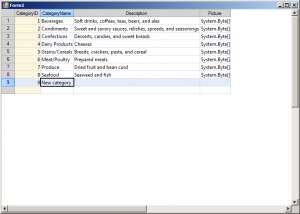
spreadsheet-databinding

The source code is available for download from here:

https://mindfusion.dev/_samples/SpreadsheetDatabase.zip

The trial version of MindFusion.Spreadsheet for WinForms can be downloaded from here:

Download MindFusion.Spreadsheet for WinForms Trial Version

About MindFusion.Spreadsheet for WinForms: A powerful .net spreadsheet component with great capabilities for editing, styling and formatting large amounts of data.

MindFusion Pack for ASP.NET 2014.R1

We have just released MindFusion.WebForms Pack 2014.R1. The diagramming component in the pack offers several new features – here is an overview:

diagram16x16Diagramming for ASP.NET

Import of Visio 2013 files
The new Visio2013Importer class can import *.vsdx files, created by Visio 2013. It is part of the MindFusion.Diagramming.Import.Visio.dll assembly and you must reference it if you want to use the importer. The Import method has various overloads, which let you choose how the Visio diagram is imported – as a whole diagram whose content is merged from all imported pages or as a DiagramDocument, whose pages correspond to the Visio drawing pages. Each Visio connector and node shape in the original diagram is represented by a matching DiagramLink and DiagramNode object in the resulting flowchart.

Canvas mode improvements

  • The HandlesStyle property of nodes is now supported in Canvas mode.
  • Dynamic links are now supported in Canvas mode.
  • You can apply layout algorithms to the content of a ContainerNode by calling its arrange method.
  • and more.

Java mode improvements

  • RoundedLinks and RoundedLinksRadius properties are now supported in Java mode.
  • AutoSnapLinks is now honored in Java mode; links drawn interactively snap to a nearby node from a distance.
  • createFontEx method added to ScriptHelper creates bold, italic and underlined fonts.
  • as well other improvements.

Miscellaneous

Several new predefined shapes are available in the Shapes class – RightTriangle, Decagon, Trapezoid, Star4Pointed, Star5Pointed, Star6Pointed, Star7Pointed, Star16Pointed, Star24Pointed, Star32Pointed, Donut and Plaque.

The new predefined node shapes.

The new predefined node shapes.

The trial version is available for download from this link:

Download MindFusion Pack for WebForms, 2014.R1

About MindFusion.WebForms Pack: A set of WebForms components that add great variety of features to your ASP.NET application with a few mouse clicks. The pack contains advanced components for diagramming, scheduling, charting and UI (Accordion, ColorPicker, TabControl, Window, WindowHost, DockControl, Button, Slideshow, Zoom and more). Each tool boasts easy to learn and use API and is quickly integrated into any web application that targets the ASP.NET platform. The controls support numerous options for styling, data import / export, user interaction and offer rich event set. There are plenty of samples and step-by-step tutorials as well detailed documentation.

Use the features page for each of the tools to find out more about its capabilities and
the numerous ways it can boost your performance and speed up the development of your application:

Visit the buy page for details on the licensing scheme and prices. If you have questions please contact us. We shall be happy to assist you.