MindFusion.Pack for WPF 2013.R1

We have just has released MindFusion.Pack for WPF 2013.R1. There are new features in most of the components in the pack. Here are the details:

Support for VisualStudio 2012

The pack installer creates VS2012 toolbox palette for all the components and can optionally install VS2012 sample projects. Toolbox palettes are also created for all .NET target environments supported by the respective Visual Studio versions.

chartMindFusion.Charting

Style and Themes

Styles define the appearance of a given chart element – the axis, the series, the legend. Each ChartTheme is a collection of styles. You can:

• create themes based on the appearance of an existing chart
• create themes with the ThemeEditor tool
• save themes to XML files
• load themes from XML files
• use a number of predefined themes

The green theme

The green theme

Improved Design Time Support

You can now edit all collection properties, including the Series collection, the brushes, strokes, legends and all other collections in design time through the property grid.

Axis Intervals

The new AxisSettings.IntervalCount property lets you specify the exact number of intervals at the axis. In such case the control does not use the Interval property and calculates the value of each interval based on AxisSettings.Min, AxisSettings.Max and AxisSettings.IntervalCount.

A bar chart with two Y-axes.

A bar chart with two Y-axes.

API Changes

diagram16x16MindFusion.Diagramming

Preserve order in tree layout

You can set now the Balance property of the TreeLayout to Preserve if you want to keep the original geometric order of child nodes when arranging them under their parent. This can be used to arrange tree branches in a specific order by first positioning them in increasing horizontal or vertical positions.

The tree layout.

The tree layout.

Selection improvements

  • Set Behavior to SelectOnly to let users select existing items, but not modify them or draw new ones.
  • Use the SetsDirtyFlag property of the Selection class to specify whether the Dirty flag should be set when selection changes.
  • The SelectionStartMoving event is now raised when the user begins moving multiple selected items.
  • Use the ToggleSelection modifier key to select or deselect items by clicking. The key disables selection via lasso rectangle.

Miscellaneous

Container nodes

Container nodes

Report-16x16MindFusion.Reporting

Exporting

You can now use the new PdfExporter and MhtmlExporter, which enable exporting to the PDF and MHTML formats respectively. You can find detailed information about the new exporters in the “Exporting Reports” theme.

Side-By-Side Containers

You can arrange items parallelly by putting them inside the new SideBySideContainer report item. You can use it, for example, to display two (or more) data ranges one next to the other.
A classic report.

A classic report.

Miscellaneous

• New DefaultEncoding property in PdfExporter;
• New Median aggregate function;

Calendar-16x16MindFusion.Scheduling

Improved item presenter

The ItemPresenter class gives you the start and end time of the represented item fragment through the new
StartTime and EndTime properties. In addition, derived classes can override the new OnStartTimeChanged,
OnEndTimeChanged, and OnItemPropertyChanged methods to get notified when the StartTime or EndTime properties change or when any property of the underlying item changes.

Item recurrence

Item recurrence

Improved recurrence

You can validate and customize the occurrences of a recurrence pattern with the new ValidateOccurrence event of the Recurrence class.

You can find more about the new features of the components at the forum. Here is a link to download the trial version:

Download MindFusion.Pack for WPF 2013.R1

About MindFusion.Wpf Pack: A set of advanced WPF components that help you build your business application easy and on time. The tools provide you with a complete set of features to create, edit and render complex flowcharts, charts, diagrams, calendars, schedules, maps and reports. A set of gauges and UI elements is also included. Each component offers various samples, tutorials and detailed documentation. The controls offer simple and intuitive API, completely customizable appearance, numerous input/output options and a rich event set. Each tool has been thoroughly tested to guarantee that you and your application get the high quality and performance you deserve.

You can read more about the capabilities of each component at its features page:

Prices and licenses are explained in details at the buy page. We offer permanent discounts to certain types of commercial as well non commercial organizations – check here if you qualify.

Diagramming for JavaScript 1.6

MindFusion has released a new version of its diagramming library for JavaScript. Here is an overview of
the most important new features in the control:

Node Effects

You can now apply two visual effects to your nodes – the GlassEffect and AeroEffect. In order to apply
an effect, create an instance of the respective class, set its properties and add the instance to the
Effects collection. You can add, remove or modify effects at any time and this will immediately affect the appearance of the diagram. You can apply effects of different types simultaneously.

Visual effects applied on diagram nodes.

Visual effects applied on diagram nodes.

Multiple labels per link

The new LinkLabel class lets you display multiple captions for a single DiagramLink object. You can fully
customize the display and positioning of the link labels. The new LinkLabel.AutoArrange property lets you arrange automatically the labels to avoid overlapping.

Selection of multiple items.

Selection of multiple items.

New events

Miscellaneous

  • The new setVirtualScroll method enables the virtual scrolling mode. In this mode, the canvas stays as big as its containing div, and its content is drawn with a translation bound to the div’s scrollbar positions. This allows displaying large diagrams in browsers and on mobile devices where the size of the HTML canvas elements is limited.
  • resizeToFitText method is added to ShapeNode.
  • Improved support for nested containers.

You can find out more about the new release at the Diagramming News section on our forum. You are welcomed to download the trial version and check yourself the capabilities of the control. Use the link below:

Download MindFusion.Diagramming for JavaScript Library 1.6

We have always taken special effort in providing quality technical support to all our clients and evaluators. You can write us at e-mail support@mindfusion.dev or use the help desk. You can use the JsDiagram section on MindFusion forum to post questions about the tool.

About Diagramming for JavaScript Library: Written 100% in JavaScript, this tool uses HTML5 Canvas to draw impressive diagrams, schemes, flowcharts, trees and many more. It is browser independent, easy to use and integrate into any web application. JsDiagram supports a variety of predefined node shapes, customizable links, rich event set and many appearance options. The user interaction model includes resizing / moving / selecting and modifying any diagram element.

The tool boasts an elegant API, which is documented in details as well numerous step-by-step guides and tutorials. Various samples are provided to let you learn quickly how to use the most important features of the library – check them here. JsDiagram is not only the perfect choice for creating any type of diagram in the browser – it can also arrange it the way you wish with a mouse click using one of its automatic graph layout algorithms. For more details about the features of the component, please visit the features page.

Diagramming for WPF 3.0.1

MindFusion has released a new version of its Diagramming component for Wpf. Most of the new features are requested by customers. Here are details:

Preserve order in tree layout
You can set the Balance property of the TreeLayout to Preserve to keep the original geometric order of child nodes when arranging them under their parent. You can use this to arrange tree branches in a specific order by first positioning them in increasing horizontal or vertical positions.

The tree layout.

The tree layout.

Selection improvements

  • When you set the Behavior property to SelectOnly users can select existing items, but not modify them or draw new ones.
  • Use the SetsDirtyFlag property of the Selection class to specify whether the Dirty flag should be set when selection changes.
  • SelectionStartMoving event is raised when the user begins moving multiple selected items.
  • You can use the ToggleSelection modifier key to select or deselect items by clicking, but selection via lasso rectangle is disabled.
Container nodes

Container nodes

Miscellaneous

You can find details about this release at the news page in the MindFusion forum. A trial version is available for immediate download from the following link:

Download MindFusion.Diagramming for WPF 3.0.1

The download contains all runtime libraries of the control, various samples for different .NET versions, extensive desktop documentation and step-by-step tutorials.

If you face difficulties installing or using Diagramming for Wpf, please contact MindFusion support team per e-mail or phone. You can also use the forum or help desk. All support inquiries are answered within hours of receiving them.

About MindFusion.Diagramming for Wpf: Designed and developed to be easy to integrate, use, and customize, this native WPF component places at your disposal every single feature you’d ever need to create flowcharts, diagrams, graphs, schemes, DB relationships, trees and many more. Its long list of style options gives you complete control over the appearance of the diagram. With a set of eight automatic layouts you are sure to choose the best arrangement for your items and make the diagram easy to comprehend.

The control boasts a long list of events, properties and methods for user interaction, item creation, data input and output. You can read the full features list here. The online demo shows samples that demonstrate various capabilities of the control – click here. The licensing scheme and prices are uploaded at the buy page. Source code is also available.

Charting for WPF 1.8

MindFusion has released a new version of its Charting component for Wpf with the following new features:

Styles and Themes
Styles define the appearance of individual chart elements such as the axis, the series and the legend. Each ChartTheme contains a collection of styles and defines the appearance of the whole chart. The new version lets you:

  • create themes based on the appearance of an existing chart;
  • create themes with the ThemeEditor tool;
  • save themes to XML files;
  • load themes from XML files;
  • use a number of predefined themes.

The “Working with Themes” tutorial gives detailed information on how to create, save, load and edit themes with MindFusion.Charting for WPF.

The green theme

The green theme

Improved Design Time Support
You can now edit all collection properties, including the Series collection, the brushes and strokes in design time through the property grid.

Axis Intervals
The new AxisSettings.IntervalCount property lets you specify the exact number of intervals at the axis. In such case, the control does not use the Interval property and calculates the value of each interval based on AxisSettings.Min, AxisSettings.Max and AxisSettings.IntervalCount properties.

You can read further details about the release and the other new features at the news section in the Charting forum. A trial version is available for download from here:

Download MindFusion.Charting for WPF 1.8 Trial Version

You are welcome to contact us with any questions, problems or inquiries about the Charting for Wpf control or any other of our products. MindFusion has always put special emphasis on providing excellent customer support and we usually answer your inquiries in a few hours of receiving them.

About MindFusion.Charting for Wpf: A programming component that combines powerful charting capabilities with an elegant API and easy use. Among the features of the control are fully customizable grid, positive and negative values on all chart axes, 3D charts, gauges and many more – read a detailed list here.

The control provides detailed documentation and various samples that demonstrate how to customize every type of chart. It supports a wide range of 2D and 3D charts including bar, line, radar, bubble pie etc. You can add tooltips, define themes, perform hit testing, zoom and more.

MindFusion Pack for Silverlight 2013.R1

MindFusion has released a new version of its Silverlight controls suite. There are new features in many of the controls, here are details:

Visual Studio 2012 Support

New assemblies for all components targeting Silverlight 5 are available. Additionally all samples provide versions for Visual Studio 2012.

chartMindFusion.Charting

Radar and Polar charts
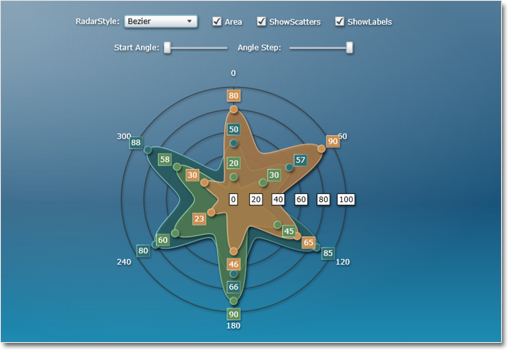
The Silverlight charting control adds a brand new types of charts – radar and polar charts. They support unlimited number of data series, 4 label types at the inner and outer axes, spiderweb, scatters and many more.

Radar chart

Radar chart

Hit testing
The new HitTest method returns a list of all ChartElement objects, which contain the specified point. Each chart type has its own ChartElement-derived class, which exposes properties for the hit object – data, labels, value etc.

Visual Effects
All chart types support the System.Windows.Media.Effects.DropShadowEffect and System.Windows.Media.Effects.Blur effect. Use the Effect property to specify the chosen effect.

diagram16x16MindFusion.Diagramming

Node Effects
You can apply to nodes two visual effects, represented by the GlassEffect and AeroEffect classes. Effects can be added, removed or modified at any time and this will immediately reflect on the diagram. Effects of different types can be applied simultaneously.

Themes and Theme Editor
A theme in DiagramLite is a set of styles, each associated with a specific item type. When the theme is applied to a diagram, the styles registered in the theme affect all objects of their associated type. Styles are associated with item types within the theme through the RegisterStyle method. The package also includes a Theme Editor tool that provides simple visual environment for theme creation and modification. There are also several predefined themes available in the Themes subfolder of the installation root folder.

Diagram documents and tabbed views
The DiagramDocument class represents a collection of diagram pages or sheets, represented by DiagramPage objects. New pages can be added to the document and existing pages can be removed and reordered via the Pages collection.

The new TabbedDiagramView can be used to display DiagramDocument objects. The view displays a tab for each page in the document. You can change the active page, add and remove pages as well rearrange them by dragging with the mouse.

One-way graph Layout
The OneWayLayout class ensures that links enter into nodes from the same general direction and exit them from the opposite side. If the graph contains cycles, some links bend around the nodes to keep the enter/exit direction consistent. The algorithm aims to minimize the number of such links.

One Way Graph Layout

One Way Graph Layout

Multiple labels per link
The LinkLabel class allows multiple captions to be displayed for a single DiagramLink object. Link labels provide a set of properties allowing full customization of their display and positioning. The labels support automatic arrangement.

Layers
Items can now be assigned to layers, and layers can be hidden, locked or moved up/down in the Z order as a group. Set the LayerIndex property of items to associate them with layers in the Diagram.Layers collection. The Layer objects provide Visible, Locked and ZIndex properties, which affect all items in the respective layer. Layers also expose a Title property shown in the LayerListView control.

Layer list control
The LayerListView control provides user interface for working with Layer objects. The control displays a list of all layers in a specified Diagram with a title and an overview area, and also allows editing of layer’s Title, Visible and Locked properties and choosing the Diagram’s currently active layer.

Magnifier
The new magnifier tool lets you interactively zoom in (or out) portions of the diagram by holding down a modifier key or pressing a mouse button. The magnifier’s zoom factor and size are
customizable.

The Magnifier Tool

The Magnifier Tool

Report-16x16MindFusion.Reporting

Side-By-Side Containers
You can arrange items in the report parallelly by putting them inside the new SideBySideContainer report item. One of the uses is to display two (or more) data ranges next to each other.

Miscellaneous

  • New DefaultEncoding property in PdfExporter;
  • New Median aggregate function;
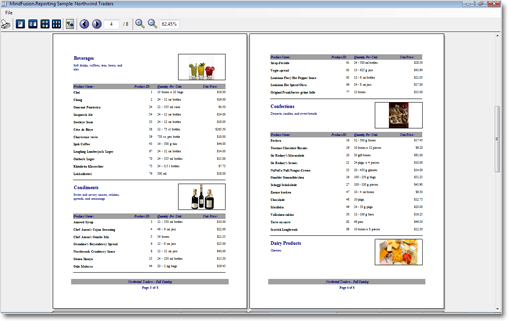
A sample report

A sample report

Calendar-16x16MindFusion.Scheduling

Improved item presenter
The ItemPresenter class now provides the start and end time of the represented item fragment through the new StartTime and EndTime properties. In addition, derived classes can override the new OnStartTimeChanged, OnEndTimeChanged, and OnItemPropertyChanged methods to get notified when the StartTime or EndTime properties change or when any property of the underlying item changes.

Improved recurrence
The Recurrennce class exposes a new event – ValidateOccurrence, which can be used to validate and customize the occurrences of a recurrence pattern.

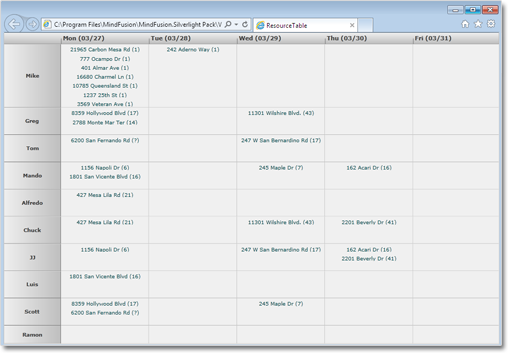
A sample schedule

A sample schedule

You can read further details about the release at the forum. A trial version is available for download from here:

Download MindFusion Silverlight Pack R1.2013

Technical Support
You are welcomed to post your questions at the forum section of the respective product. You can also use the help desk or the support e-mail. MindFusion puts special effort in providing fast and competent technical support to everyone using our products.

About MindFusion.Silverlight Pack: A set of advanced Silverlight components that help you build your business application easy and on time. The tools provide you with a complete set of features for creating, editing and rendering complex flowcharts, charts, diagrams, calendars, maps, schedules and reports. A set of gauges and UI elements is also included. Each component offers various samples, tutorials and detailed documentation. The controls offer simple and intuitive API, completely customizable appearance, numerous input/output options and a rich event set. Each tool has been thoroughly tested to guarantee that you and your application get the high quality and performance you deserve.