MindFusion.Spreadsheet for WinForms 1.0.1

MindFusion has released version 1.0.1 of its spreadsheet component. The new release has fixed various bugs and offers improved binary and XML serialization. We have made some major changes to the control and it is not backward compatible.

A spreadsheet created with MindFusion.Spreadsheet for WinForms

A spreadsheet created with MindFusion.Spreadsheet for WinForms

You can download the trial version from the link below:

MindFusion.Spreadsheet for WinForms 1.0.1

If you require technical support, you can post a message at the forum, send us an e-mail at support@mindfusion.dev. or use the help desk. MindFusion takes special effort in providing fast and detailed answers to all inquiries that we receive.

About MindFusion.Spreadsheet for WinForms: An easy-to-use programming component suitable for building all types of spreadsheets fast and easy. The tool supports formulas, tool-tips, cell annotations, cell spanning, scrolling and many more. You can add charts and images as well use the flexible style system to design the perfect spreadsheet. The component supports full undo and redo as well copy and paste from Windows clipboard. You can import spreadsheet data from CSV, XLSX or ODS files and export the final spreadsheet in a number of formats – as images, PDF or CSV files. Various auxiliary forms help you quickly adjust the data and appearance of your spreadsheet. Read more about the features of the component here or check the license prices at the buy page.

Spreadsheet for WinForms is part of MindFusion Pack for WinForms, which offers other useful components that are of great use when you build any type of WinForms application – from a diagramming library to map control to gauges: check them here.

Diagramming for JavaScript, V1.7.1

MindFusion has released a new version of its diagramming component for JavaScript. Here is an overview of the new features in Diagramming for JavaScript, V1.7.1:

Rounded links
If your links are with Polyline or Cascading Shape, they can be rendered with rounded joints between the segments. You need to call the new Diagram.setRoundedLinks(true) method to enable this. The radius of joint arcs is specified with the Diagram.setRoundedLinksRadius.

Arcs at links crossings.

Arcs at links crossings.

Link crossings
The component can now represent the crossing point of two links either as an arc (bridge) drawn for the link with the higher Z-index, or as a cut in the link with lower Z-index. Call the Diagram.setLinkCrossings() methods with either LinkCrossings.Arcs or LinkCrossings.Cut as an argument. The radius of crossing arcs is specified with Diagram.setCrossingRadius().

Miscellaneous

  • By node rotation, the links are now routed around the rotated node’s boundaries.
  • The new routeAllLinks pulls apart link segments that would overlap.
  • A set of new predefined node shapes are added to the Shapes class: RightTriangle, Decagon, Trapezoid, Star4Pointed, Star5Pointed, Star6Pointed, Star7Pointed, Star16Pointed, Star24Pointed, Star32Pointed, Donut and Plaque.
  • and much more – read the full list here.

The trial version of the new Diagramming for JavaScript release is available for direct download from the following link:

Download MindFusion.Diagramming for JavaScript Library 1.7.1

We have always taken special effort in providing quality technical support to all our clients and evaluators. You can write us at e-mail support@mindfusion.dev or use the help desk. You can use the JsDiagram section on MindFusion forum to post questions about the tool.

About Diagramming for JavaScript Library: Written 100% in JavaScript, this tool uses HTML5 Canvas to draw impressive diagrams, schemes, flowcharts, trees and many more. It is browser independent, easy to use and integrate into any web application. JsDiagram supports a variety of predefined node shapes, customizable links, rich event set and many appearance options. The user interaction model includes resizing / moving / selecting and modifying any diagram element.

The tool boasts an elegant API, which is documented in details as well numerous step-by-step guides and tutorials. Various samples are provided to let you learn quickly how to use the most important features of the library – check them here. JsDiagram is not only the perfect choice for creating any type of diagram in the browser – it can also arrange it the way you wish with a mouse click using one of its automatic graph layout algorithms. For more details about the features of the component, please visit the JsDiagram page.

Diagramming for Android, V1.0.2 Has Been Released

MindFusion has released a version 1.0.2 of its Diagramming component for Android. Here is an overview of the new features:

Swimlanes

The lanes grid lets you emphasize the relationship between a group of diagram items by displaying them in a distinct lane or cell within the grid. To display the lane grid, set the EnableLanes property of the Diagram class to true. The swimlane grid can be customized through various attributes exposed by the Diagram.LaneGrid property. You can specify the number of rows and columns, the headers, the cell appearance and others.

Swimlanes in an Android app.

Swimlanes in an Android app.

Miscellaneous

  • New stock shapes have been added to the Shape class: RightTriangle, Decagon, Trapezoid, Star4Pointed, Star5Pointed, Star6Pointed, Star7Pointed, Star16Pointed, Star24Pointed, Star32Pointed, Donut and Plaque.
  • A long press displays the context menu if View.setOnCreateContextMenuListener method has been called.
  • resizeToFitText method added to ShapeNode and TreeViewNode.
Android app showing a typical flowchart.

Android app showing a typical flowchart.

The new version is available for download from the following link:

Download Diagramming for Android, V1.0.2

If you require technical support, please use the forum or write us at support@mindfusion.dev. A help desk is also available. Providing fast and competent technical support is among the priorities of MindFusion. We answer most support inquiries within hours of receiving them.

About Diagramming for Android: A native Java class library, which provides your Android application with a powerful set of features for creating, customizing and displaying flowcharts, genealogy trees, class hierarchies, networks, algorithms and much more. The component offers a rich choice of predefined shapes, many pen and brush options as well HTML-like formatting of text. Diagram nodes can hold text as well images, can be semi-transparent and support glass reflection effects. The component offers various automatic layout algorithms and a rich user interaction model, which supports zoom, scroll, alignment guides and more. You can read the features list at the features web page of the component. For pricing and licenses check this link.

MindFusion.Scheduling for Java Swing, V1.1

MindFusion has released a new version of its scheduling library for Java Swing. Here is an overview of the new features:

Item Effects

You can apply the new Glass and Aero visual effects to all items. If you want to apply an effect, create an instance of one of the effect classes, set up its properties and add the instance to the AwtCalendar.ItemEffects collection. You can choose between two effect types – AeroEffect and GlassEffect. You can add, remove or modify effects at any time and this will reflect immediately on the appearance of the calendar. The Item Effects topic in the library’s documentation gives detailed explanation on how to create and apply visual effects.

Item visual effects

Item visual effects

Custom Grouping

Custom grouping lets you specify secondary resources individually for each primary resource. You an do this with the new customizeGrouping event. You can also apply grouping by the runtime type of the resources, not just the four predefined categories.

Custom grouping of items

Custom grouping of items

New Events

The CalendarListener interface exposes several new events – beginItemDrawing, itemDrawing, endItemDrawing, and filterItem.

Miscellaneous

  • We have fixed a bug where styled item texts did not appear.
  • The getExactDateAt method works more consistently in various scenarios.
  • New setViewport method.

You can read more about the new version at the forum. The trial version is available for immediate download from the link below:

Download Scheduling for Java Swing Library, V1.1 Trial Version

Technical support is available at the Scheduling for Java forum, per e-mail or through the help desk. Providing timely and high-quality technical support to all its clients and evaluators is a priority for MindFusion. We make sure your questions get competent and detailed answers within hours after being posted.

About Scheduling for Java Swing: A programming class library written entirely in Java that lets you build the most sophisticated schedules, calendars and task managers fast and easy. The component boasts a comprehensive feature set that includes custom-typed events, undo/redo functionality, scrolling, tool tips and much more. You can choose among six view styles, which are easy to change and customize. The appearance of each schedule is completely customizable and supports themes, user-assigned mouse cursors and a variety of font, pen and brush options.

A detailed list with the features of the tool is available at the Scheduling for Java Swing features page. The trial version includes a variety of samples and you have plenty of sample code to study. Online documentation with useful tutorials is also available.

The library is royalty-free, source-code is also available. You can see a list of the current prices here. Check the discount page for a list of the available discounts.

Diagramming for Java Swing, V4.0.2

MindFusion.Diagramming for Java Swing, V4.0.2 has just been released. The new features are mostly requested by the users, we have also fixed several bugs. Here are the details:

ContainerNode improvements

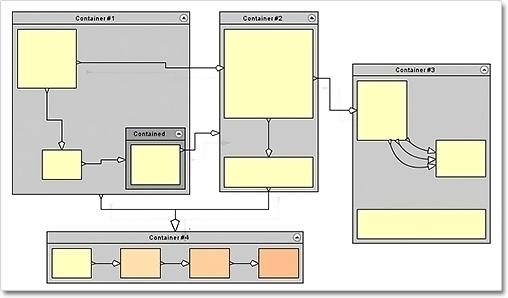
  • JDiagram now draws child nodes by their container. When containers overlap, the children of the lower container can no longer appear above the children of the upper container;
  • You can use the new ClipChildren property to specify whether child items are clipped to the boundaries of the container;
  • When you drop nodes into a container, the ZIndex property is not changed automatically;
  • and more.
Container nodes

Container nodes

Miscellaneous

  • The placement of link labels at shorter link segments is improved.
  • The new DiagramLink.intersects method checks whether two links intersect.
  • You can use the hitTest method to determine whether a diagram item or any of its child items contain the specified point.
  • The getFlatItemList method returns a list of all TreeViewNode items.
  • as well other new properties and methods – check the complete list here.
Labels at diagram links

Labels at diagram links

You can download the control and test yourself its performance and functionality. Here is a direct link to the trial version:

Download MindFusion.Diagramming for Java Swing, V4.0.2

Technical support

Your questions about the library or any other of our components are welcomed by our support team. You can write at the forum, help desk or at support@mindfusion.dev.

About Diagramming for Java Swing: MindFusion.Diagramming for Java Swing provides your Java application with all necessary functionality to create and customize a diagram. The library is very easy to integrate and program. There are numerous utility methods, rich event set, more than 80 predefined shapes. The tool supports a variety of ways to render or export the diagram, advanced node types like TreeView nodes, hierarchical nodes, tables, container nodes and many more. There are 15 automatic layouts, various input / output options and fully customizable appearance. A detailed list with JDiagram’s features is uploaded here. You can check the online demo to see some of the functionality implemented.

Diagramming for Java Swing is royalty free, there are no distribution fees. Licenses depend on the count of developers using the tool – check here the prices.