Diagramming for Android, V1.1 Beta

MindFusion has just released a beta version of its Diagramming for Android library. Here is an overview of the new features:

Tree map layout
Tree maps represent hierarchies by nesting child nodes within their parents, where the areas of leaf nodes are proportional to their Weight values. Unlike other layout algorithms, TreeMapLayout expects hierarchies to be defined via grouping or containment (see AttachTo method and ContainerNode class), and will ignore any links in the diagram. The diagram area covered by the topmost nodes in a hierarchy is specified via the LayoutArea property. By default, the layout tries to keep the ratio of node sides as close as possible to one.

The tree map layout.

The tree map layout.

Decision flowchart layout
DecisionLayout arranges simple flowcharts consisting of decision boxes with up to three outgoing links per node and activity boxes with a single outgoing link per node. The nodes are arranged in columns and rows, whose distance depends on the HorizontalPadding and VerticalPadding property values. When links share the same row or column, they are placed at a distance specified via LinkPadding. The layout arranges nodes recursively starting from StartNode.

The decision flowchart layout.

The decision flowchart layout.

Composite nodes
The CompositeNode class implements nodes whose appearance can be defined via composition of components and layout containers. You can load the content of a composite node from XML files similar to .NET Xaml templates and Android XML layouts. This initial release includes layout containers such as StackPanel and GridPanel, and read-only components like ImageComponent, TextComponent, ShapeComponent, BorderComponent. Future versions will add interactive components like buttons and text editors.

Resize multiple nodes
Now you can resize multiple selected nodes simultaneously. To enable that, set the AllowMultipleResize property to true. When enabled, dragging a corner or side adjustment handle of any node resizes all nodes in the selection. The operation will be cancelled for all nodes if any of them does not accept its new size, e.g. if it’s smaller than minimum allowed node size.

Binary serialization
Use the new saveTo and loadFrom methods, which implement serialization using Java Serializable interface. In addition, saveToString now creates base64-encoded string from a byte stream containing the binary-serialized form of the diagram. Binary format requires less memory and is much faster to process, which makes it more suitable for saving the diagram as part of Android Activity state.

Miscellaneous

  • Layout algorithms now automatically resize diagram’s Bounds if it’s not large enough to fit the
    arranged content.
  • LinkLabels are now copied by DiagramLink copy constructor and clipboard methods.

The new version is available for download from the following link:

Download Diagramming for Android, V1.1 Beta

If you require technical support, please use the forum or write us at support@mindfusion.dev. A help desk is also available. Providing fast and competent technical support is among the priorities of MindFusion. We answer most support inquiries within hours of receiving them.

About Diagramming for Android: A native Java class library, which provides your Android application with a powerful set of features for creating, customizing and displaying flowcharts, genealogy trees, class hierarchies, networks, algorithms and much more. The component offers a rich choice of predefined shapes, many pen and brush options as well HTML-like formatting of text. Diagram nodes can hold text as well images, can be semi-transparent and support glass reflection effects. The component offers various automatic layout algorithms and a rich user interaction model, which supports zoom, scroll, alignment guides and more. You can read the features list at the features web page of the component. For pricing and licenses check this link.

Diagramming for JavaScript, V2.1

MindFusion has just released a beta version of the Diagramming for JavaScript library.

SVG Nodes
The SvgNode class represents nodes that can display SVG drawings. SVG graphics are rendered instead of Image, and on top of the geometry rendered by the base ShapeNode class. You can enable the Transparent property to hide the node’s geometry and leave visible only the drawing.

SVG Nodes built with MindFusion.Diagramming for JavaScript.

SVG Nodes built with MindFusion.Diagramming for JavaScript.

jQuery support
You can now use jQuery for browser abstraction instead of Microsoft Ajax. To enable jQuery support, set MindFusionImpl=”JQuery” before loading the diagram script. Instead of Microsoft Ajax $create function, use the static Diagram.create(element) method to create a Diagram instance for a given Canvas element.

Miscellaneous

  • Set the BackgroundImageUrl property to draw an image as Diagram’s background.
  • The TextStyle property of links provides support for several different text position and orientation styles, defined by the LinkTextStyle enumeration.
  • Set the AllowUnconnectedLinks property to true to let users draw links without connecting them
    to nodes.

You can download the trial version directly from the following link:

Download Diagramming for JavaScript, V2.1 Trial Version

We shall be glad to receive any comments, suggestions and feedback. You can write us at e-mail support@mindfusion.dev or use the help desk. You can use the JsDiagram section on MindFusion forum to post questions about the tool.

About Diagramming for JavaScript Library: Written 100% in JavaScript, this tool uses HTML5 Canvas to draw impressive diagrams, schemes, flowcharts, trees and many more. It is browser independent, easy to use and integrate into any web application. JsDiagram supports a variety of predefined node shapes, customizable links, rich event set and many appearance options.

The user interaction model includes resizing / moving / selecting and modifying any diagram element. The tool boasts an elegant API, which is documented in details as well numerous step-by-step guides and tutorials. Various samples are provided to let you learn quickly how to use the most important features of the library – check them here. JsDiagram is not only the perfect choice for creating any type of diagram in the browser – it can also arrange it the way you wish with a mouse click using one of its automatic graph layout algorithms. For more details about the features of the component, please visit the JsDiagram page.

Diagramming for Silverlight, V3.1

The new release of Diagramming for Silverlight provides two new layouts and a few other new features. Here is an overview:

Tree map layout
Tree maps represent hierarchies by nesting child nodes within their parents, where the areas of leaf nodes are proportional to their Weight values. Unlike other layout algorithms, TreeMapLayout expects hierarchies to be defined via grouping or containment (see AttachTo method and ContainerNode class), and will ignore any links in the diagram. The diagram area covered by the topmost nodes in a hierarchy is specified via the LayoutArea property. By default, the layout tries to keep the ratio of node sides as close as possible to one.

The tree map layout.

The tree map layout.

Decision flowchart layout
DecisionLayout arranges simple flowcharts consisting of decision boxes with up to three outgoing links per node and activity boxes with a single outgoing link per node. The nodes are arranged in columns and rows, whose distance depends on the HorizontalPadding and VerticalPadding property values. When links share the same row or column, they are placed at a distance specified via LinkPadding. The layout arranges nodes recursively starting from StartNode.

The decision layout.

The decision layout.

Miscellaneous
~ Layout algorithms now automatically resize diagram’s Bounds if it’s not large enough to fit the arranged content.
~ LinkLabels are now copied by DiagramLink copy constructor and clipboard methods.
~ ContainerNode now displays a caption bar when its Shape is set to Rectangle or RoundRect.

You can download the trial version directly from the link below:

Download DiagramLite 3.0.1 Trial Version

Feel free to contact us with any questions about Diagramming for Silverlight or any other of our products – please use the forum, email support@mindfusion.dev or the help desk. We strive to provide competent and detailed answers to all support inquiries within hours of receiving them.

About MindFusion.Diagramming for Silverlight: A programming component specially designed and developed to provide web developers with a fast and easy way to create diagrams, graphs, schemes, hierarchies, charts and many more. The impressive feature set of the control ranges from predefined node shapes to custom nodes and thirteen automatic layouts. The style and appearance of all diagram elements are completely customizable, the numerous samples provide programmers with plenty of example code to look from.

The control boasts intuitive API that is documented in details in the help file provided with the installation. There are also step-by-step tutorials and various guides. You can check the features
list here to find out more about the
capabilities of the tool. An online demo is also available. The prices are per developer, source code is also available. Learn more about the licensing scheme here.

Diagramming for JavaScript with jQuery

Diagramming for JavaScript can use jQuery for browser abstraction instead of Microsoft Ajax. If you want to try the new feature, please download this archive containing a pre-release mindfusion.diagramming.js build and a sample page:

https://mindfusion.dev/_beta/jsdiag_jquery.zip

To enable jQuery support, set MindFusionImpl=”JQuery” before loading the diagram script:

Code:

MindFusionImpl = "JQuery"; 

Instead of MSAjax $create function, use the static Diagram.create(element) method to create a Diagram instance for given Canvas element:

Code:

diagram = MindFusion.Diagramming.Diagram.create($("#diagram")[0]); 
A sample diagram.

A sample diagram.

We welcome any comments, suggestions and feedback. You can write us at e-mail support@mindfusion.dev or use the help desk. You can use the JsDiagram section on MindFusion forum to post questions about the tool.

About Diagramming for JavaScript Library: Written 100% in JavaScript, this tool uses HTML5 Canvas to draw impressive diagrams, schemes, flowcharts, trees and many more. It is browser independent, easy to use and integrate into any web application. JsDiagram supports a variety of predefined node shapes, customizable links, rich event set and many appearance options. The user interaction model includes resizing / moving / selecting and modifying any diagram element.

The tool boasts an elegant API, which is documented in details as well numerous step-by-step guides and tutorials. Various samples are provided to let you learn quickly how to use the most important features of the library – check them here. JsDiagram is not only the perfect choice for creating any type of diagram in the browser – it can also arrange it the way you wish with a mouse click using one of its automatic graph layout algorithms. For more details about the features of the component, please visit the JsDiagram page.

Diagramming for JavaScript, V2.0

We have released Diagramming for JavaScript with a host of new features. Here is an overview:

Undo / redo support
If you set the UndoEnabled property to true, the Diagram control tracks changes done to its items and allows undoing and redoing them later by calling the undo() and redo() methods respectively. Multiple changes could be recorded as a single undoable operation by enclosing them between startCompositeOperation() and commitCompositeOperation() calls. You can also create custom undoable operations.

Animations
You can animate Diagram items through the Animation class in the MindFusion.Animations namespace. The class
implements several built-in animation and easing types, and allows definition of custom animation functions, to create fluid and pleasing animation effects.

Clipboard support
Now you can copy or cut a single item or a selection of items to a clipboard maintained by the diagram control. This is done programmatically using the copyToClipboard and cutToClipboard methods. To paste the clipboard contents into the current diagram, call pasteFromClipboard.

Swimlanes
The lane grid lets you emphasize the relationship between a group of diagram items by displaying them in a distinct lane or cell within the grid. If you want to display the lane grid, set the EnableLanes property of the Diagram class to true. In order to customize the grid, set the various attributes exposed by the LaneGrid property, which lets you specify the number of rows and columns, add headers, customize the cell appearance, etc.

A diagram with swimlanes.

A diagram with swimlanes.

Resize of multiple nodes
You can now resize multiple selected nodes simultaneously – just set the AllowMultipleResize property to true. When enabled, dragging a corner or side adjustment handle of any node resizes all nodes in the selection. The selectionModifying validation event lets you cancel the operation for all nodes.

Magnifier
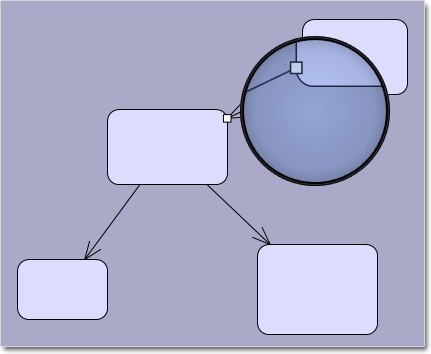
The new magnifier tool allows users to interactively zoom in (or out) portions of the diagram by holding down a modifier key or pressing a mouse button. You can customize the magnifier’s appearance via properties such as MagnifierShape and MagnifierFrameColor. Its size and magnification can be set via MagnifierWidth, MagnifierHeight and MagnifierFactor properties.

The new magnifier tool.

The new magnifier tool.

Intellisense support
The package now includes a MindFusion.Diagramming-vsdoc.js file providing code completion information. To load it in Visual Studio, add e /// <reference path=”MindFusion.Diagramming-vsdoc.js” /> tag to the top of your script files. Use the static Diagram.create and Diagram.find methods instead of $create and $find to let Visual Studio infer the type of returned Diagram objects correctly.

Miscellaneous

  • Set the ModificationStart property to AutoHandles to let users start moving or resizing an item without selecting it first.
  • The diagram area can be resized automatically to fit the current diagram items as set through the AutoResize property.
  • The AutoScroll property enables automatic scrolling when the mouse is dragged near the diagram edges.
  • And much more. Read the full list here.

The trial version of the new Diagramming for JavaScript release is available for direct download from the following link:

Download MindFusion.Diagramming for JavaScript Library 2.0 Trial Version

We have always taken special effort in providing quality technical support to all our clients and evaluators. You can write us at e-mail support@mindfusion.dev or use the help desk. You can use the JsDiagram section on MindFusion forum to post questions about the tool.

About Diagramming for JavaScript Library: Written 100% in JavaScript, this tool uses HTML5 Canvas to draw impressive diagrams, schemes, flowcharts, trees and many more. It is browser independent, easy to use and integrate into any web application. JsDiagram supports a variety of predefined node shapes, customizable links, rich event set and many appearance options. The user interaction model includes resizing / moving / selecting and modifying any diagram element.

The tool boasts an elegant API, which is documented in details as well numerous step-by-step guides and tutorials. Various samples are provided to let you learn quickly how to use the most important features of the library – check them here. JsDiagram is not only the perfect choice for creating any type of diagram in the browser – it can also arrange it the way you wish with a mouse click using one of its automatic graph layout algorithms. For more details about the features of the component, please visit the JsDiagram page.