Diagramming for Java Swing, V4.1.2

MindFusion is proud to announce the new release of the Java diagramming library with the following new features:

AnchorPatern improvements

  • You can use the XUnit and YUnit properties to specify the coordinates of an AnchorPoint as a fixed offset from the node’s top-left corner rather than in percentage, so that the point position does not change when the node is resized.
  • The AnchorPattern property of Shape class lets you associate anchor points with shape definitions. If a ShapeNode instance does not contain its own AnchorPattern, it will derive the one defined by the node’s Shape.
Anchor points for a box shape.

Anchor points for a box shape.

Miscellaneous

  • Type of Margin property of LinkLabel has been changed from float to Thickness.
    ~ The changeUnit method sets a new MeasureUnit and scales the coordinates of diagram items to keep them the same size.
  • Fixed node spacing in bottom-to-top TreeLayout.
  • TabbedScrollPane allows reordering tabs when AllowTabReorder property is enabled.
  • Improved quality of print preview page images.
  • DisableTextClipping property added to PdfExporter enables work-around for limit-check errors when Adobe Reader prints to some PostScript printers.
The tree layout is used to arrange the newly created boxes dynamically.

The tree layout is used to arrange the newly created boxes dynamically.

The trial version is available for download from the following link:

Download MindFusion.Diagramming for Java Swing, V4.1.2 Trial Version

Technical support
MindFusion puts special effort in providing high quality technical support to all its clients and evaluators. You can post your questions about Diagramming for Java or any other of our components at the forum, help desk or at support@mindfusion.dev. All support inquiries are usually answered within hours of being received.

About Diagramming for Java Swing: MindFusion.Diagramming for Java Swing provides your Java application with all necessary functionality to create and customize a diagram. The library is very easy to integrate and program. There are numerous utility methods, rich event set, more than 100 predefined shapes. The tool supports a variety of ways to render or export the diagram, advanced node types like TreeView nodes, hierarchical nodes, tables, container nodes and many more. There are 15 automatic layouts, various input / output options and fully customizable appearance. A detailed list with JDiagram’s features is uploaded here. You can check the online demo to see some of the functionality implemented.

Diagramming for Java Swing is royalty free, there are no distribution fees. Licenses depend on the count of developers using the tool – check here the prices.

Diagramming for WPF, V3.1

MindFusion has released a new version of Diagramming for WPF. It adds two new layout algorithms, here are the details:

Tree map layout
Tree maps represent hierarchies by nesting child nodes within their parents, where the areas of leaf nodes are proportional to their Weight values. Unlike other layout algorithms, TreeMapLayout expects hierarchies to be defined via grouping or containment (see AttachTo method and ContainerNode class), and will ignore any links in the diagram. The diagram area covered by the topmost nodes in a hierarchy is specified via the LayoutArea property. By default, the layout tries to keep the ratio of node sides as close as possible to one.

The tree map layout.

The tree map layout.

Decision flowchart layout
DecisionLayout arranges simple flowcharts consisting of decision boxes with up to three outgoing links per node and activity boxes with a single outgoing link per node. The nodes are arranged in columns and rows, whose distance depends on the HorizontalPadding and VerticalPadding property values. When links share the same row or column, they are placed at a distance specified via LinkPadding. The layout arranges nodes recursively starting from StartNode.

The decision layout.

The decision layout.

Miscellaneous
Layout algorithms now automatically resize diagram’s Bounds if it’s not large enough to fit the arranged content. To revert to old behavior and keep fixed Bounds size, set GrowToFit to false.

You can download the trial version of the software from this link:

Download MindFusion.Diagramming for WPF 3.1

The download contains all runtime libraries of the control, various samples for different .NET versions, extensive desktop documentation and step-by-step tutorials.

If you face difficulties installing or using Diagramming for Wpf, please contact MindFusion support team per e-mail or phone. You can also use the forum or help desk. Most support inquiries are answered within hours of receiving them.

About MindFusion.Diagramming for Wpf: Designed and developed to be easy to integrate, use, and customize, this native WPF component places at your disposal every single feature you would ever need to create flowcharts, diagrams, graphs, schemes, DB relationships, trees and many more. Its long list of style options gives you complete control over the appearance of the diagram. With a set of eight automatic layouts you are sure to choose the best arrangement for your items and make the diagram easy to comprehend.

The control boasts a long list of events, properties and methods for user interaction, item creation,
data input and output. You can read the full features list here. The online demo shows samples that demonstrate various capabilities of the control. The licensing scheme and prices are uploaded at the buy page. Source code is also available.

Diagramming for JavaScript, V2.0

We have released Diagramming for JavaScript with a host of new features. Here is an overview:

Undo / redo support
If you set the UndoEnabled property to true, the Diagram control tracks changes done to its items and allows undoing and redoing them later by calling the undo() and redo() methods respectively. Multiple changes could be recorded as a single undoable operation by enclosing them between startCompositeOperation() and commitCompositeOperation() calls. You can also create custom undoable operations.

Animations
You can animate Diagram items through the Animation class in the MindFusion.Animations namespace. The class
implements several built-in animation and easing types, and allows definition of custom animation functions, to create fluid and pleasing animation effects.

Clipboard support
Now you can copy or cut a single item or a selection of items to a clipboard maintained by the diagram control. This is done programmatically using the copyToClipboard and cutToClipboard methods. To paste the clipboard contents into the current diagram, call pasteFromClipboard.

Swimlanes
The lane grid lets you emphasize the relationship between a group of diagram items by displaying them in a distinct lane or cell within the grid. If you want to display the lane grid, set the EnableLanes property of the Diagram class to true. In order to customize the grid, set the various attributes exposed by the LaneGrid property, which lets you specify the number of rows and columns, add headers, customize the cell appearance, etc.

A diagram with swimlanes.

A diagram with swimlanes.

Resize of multiple nodes
You can now resize multiple selected nodes simultaneously – just set the AllowMultipleResize property to true. When enabled, dragging a corner or side adjustment handle of any node resizes all nodes in the selection. The selectionModifying validation event lets you cancel the operation for all nodes.

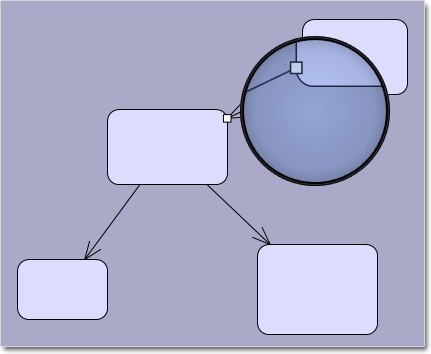
Magnifier
The new magnifier tool allows users to interactively zoom in (or out) portions of the diagram by holding down a modifier key or pressing a mouse button. You can customize the magnifier’s appearance via properties such as MagnifierShape and MagnifierFrameColor. Its size and magnification can be set via MagnifierWidth, MagnifierHeight and MagnifierFactor properties.

The new magnifier tool.

The new magnifier tool.

Intellisense support
The package now includes a MindFusion.Diagramming-vsdoc.js file providing code completion information. To load it in Visual Studio, add e /// <reference path=”MindFusion.Diagramming-vsdoc.js” /> tag to the top of your script files. Use the static Diagram.create and Diagram.find methods instead of $create and $find to let Visual Studio infer the type of returned Diagram objects correctly.

Miscellaneous

  • Set the ModificationStart property to AutoHandles to let users start moving or resizing an item without selecting it first.
  • The diagram area can be resized automatically to fit the current diagram items as set through the AutoResize property.
  • The AutoScroll property enables automatic scrolling when the mouse is dragged near the diagram edges.
  • And much more. Read the full list here.

The trial version of the new Diagramming for JavaScript release is available for direct download from the following link:

Download MindFusion.Diagramming for JavaScript Library 2.0 Trial Version

We have always taken special effort in providing quality technical support to all our clients and evaluators. You can write us at e-mail support@mindfusion.dev or use the help desk. You can use the JsDiagram section on MindFusion forum to post questions about the tool.

About Diagramming for JavaScript Library: Written 100% in JavaScript, this tool uses HTML5 Canvas to draw impressive diagrams, schemes, flowcharts, trees and many more. It is browser independent, easy to use and integrate into any web application. JsDiagram supports a variety of predefined node shapes, customizable links, rich event set and many appearance options. The user interaction model includes resizing / moving / selecting and modifying any diagram element.

The tool boasts an elegant API, which is documented in details as well numerous step-by-step guides and tutorials. Various samples are provided to let you learn quickly how to use the most important features of the library – check them here. JsDiagram is not only the perfect choice for creating any type of diagram in the browser – it can also arrange it the way you wish with a mouse click using one of its automatic graph layout algorithms. For more details about the features of the component, please visit the JsDiagram page.

MindFusion.Diagramming for WinForms, V6.1.3

We have released Diagramming for WinForms, V6.1.3 with the following new features:

Export of Visio 2013 files
You can use the Visio2013Exporter class to export the contents of your Diagram and DiagramDocument objects to Visio 2013 VSDX files. First, you need a reference to the MindFusion.Diagramming.Export.Visio.dll assembly. Currently, the exporter supports shapes from the Visio basic stencil. We shall add support for more shapes upon request. You can learn more on how to use the exporter at the MindFusion.Diagramming for WinForms news announcement page or from the product’s online documentation.

Improvements in the Visio2013Importer

  • The importer now supports Visio group shapes. Child shapes in groups are no longer lost when importing, and their corresponding diagram nodes are attached to the corresponding group node.
  • Visio NURBS curves are now imported as Bezier-style links.
  • Shapes with a ‘hidden’ attribute in master definition are now imported as invisible items.
  • and more.

Headers and footers in PDF
The PdfExporter class can add headers and footers to the exported pages. Use the HeaderFormat, HeaderFont, FooterFormat and FooterFont properties to specify the contents and the font.

The PdfExporter

The PdfExporter

You can read further details about this release at the news page in the Diagramming for WinForms forum. If you are willing to try the new version here is a link to download it:

Diagramming for WinForms, V6.1.3

If you have questions or run into problems using the component you can use the Diagramming for WinForms forum, the help desk or write us at support@mindfusion.dev. Our support team will be pleased to help you.

About MindFusion.Diagramming for WinForms: A programming component that provides any WinForms application with a full set of features for creating and customizing all types of diagrams, flowcharts, schemes, hierarchies, trees, graphs etc. The control provides numerous ways to save and load a diagram, six auxiliary controls and more than 10 automatic graph layout algorithms. Diagram elements include scrollable tables, container nodes, multi-segment arrows, custom diagram item types and many more. Further
details here.

Diagramming for WinForms is a royalty-free component, clients get 12 month upgrade subscription when buying a license. The source code is also available for purchase. Visit the buy page for a list with the current license prices.

MindFusion.WinForms Pack 2014.R3

MindFusion is pleased to announce the release 2014.R3 of the Pack for WinForms component suite. Here is an overview of the new features:

diagram16x16MindFusion.Diagramming

Export to Visio 2013 files
The new Visio2013Exporter class lets you export the contents of Diagram and DiagramDocument objects to Visio 2013 VSDX files. You must add a reference to the MindFusion.Diagramming.Export.Visio.dll assembly beforehand. Further details on how to use the Visio2013Exporter can be found in the forum or the online help.

Headers and Footers in PDF
You can now add a header and a footer to all exported to PDF pages. Their content and font are customizable – use HeaderFormat, HeaderFont, FooterFormat and FooterFont to do it.

The PdfExporter

The PdfExporter

Calendar-16x16MindFusion.Scheduling

New Holiday Providers
You can use one of the new holiday providers, added to the MindFusion.HolidayProviders.dll assembly – FranceHolidayProvider, GermanyHolidayProvider, RussiaHolidayProvider, and UKHolidayProvider.

Miscellaneous

  • A new Drawing event enables custom drawing of calendar elements before their default rendering.
  • Improved support for partial databinding.

Spreadsheet-16x16MindFusion.Spreadsheet

Export to XLSX (Office Open XML) format
Use the new ExcelExporter class to export MindFusion.Spreadsheet Workbook objects to Excel. To export a workbook to XLSX, create an instance of the ExcelExporter class and call its Export method, passing the Workbook object as parameter.

Export to ODS (OpenDocument Spreadsheet) format
The new CalcExporter class lets you export MindFusion.Spreadsheet Workbook objects to the OpenDocument format. To export a workbook, create an instance of the CalcExporter class and call its Export method, passing the Workbook object as parameter.

Export to XHTML and MHTML format
Two new classes – HtmlExporter and MhtmlExporter – let you export MindFusion.Spreadsheet Workbook objects to (X)HTML and MHTML files. To export a workbook, create an instance of the respective exporter class and call its Export method, passing the Workbook object as parameter.

Export to XHTML.

Export to XHTML.

Moving cell ranges
You can move cells and cell ranges programmatically as well interactively. In order to move a column/row programmatically you should call one of the Move overloads of the of the ColumnCollection or RowCollection classes respectively, and specify the column/row to move and the desired location. To move columns or rows interactively, select the columns or rows entirely, click on any of the selected column or row headers and drag.

Find and replace
You can now use a variety of methods to search and replace texts. For searching, use the Find and FindAll methods. For replacing text use Replace and ReplaceAll. The new FindReplaceForm class (contained in the MindFusion.Spreadsheet.WinForms.StandardForms.dll assembly) can be used to facilitate search and replace operations inside a workbook.

Improved in-place editing
In-place formula editing has been extended with automatic literal, string, cell and cell range coloring
and context-sensitive tooltip information for functions.

In-place editing.

In-place editing.

Miscellaneous

  • The parameters of the Export methods of some exporters have been reordered to improve consistency. Now the Worksheet/Workbook being exported is always the first argument.
  • The HyperlinkForm constructors now require an addition argument of type Workbook.
  • New PageOrientation property added to the PdfExporter class.

uiMindFusion.UI

DockControl
Layout serialization has been added to the DockControl.

The trial version is available for direct download from this link:

Download MindFusion.WinForms Pack 2014.R3

If you run into problems with any of the components, please let us know. We shall be glad to assist you. MindFusion is proud with its excellent technical support – the majority of the questions are answered within hours of receiving them.

About MindFusion.WinForms Pack: A set of five WinForms programming components that provide your application with a rich choice of diagramming, charting, scheduling, mapping, reporting and gauge features. The tools are very easy to implement and use. They boast intuitive API and various step-by-step tutorials to get you started. Both online and offline documentation is available.

A sample browser presents you with all the samples for each control to let you easily navigate to what you need. You can check some of the features of each component right now if you look at the online demos:

Visit the features – page of the components for more information about their capabilities:

You can check the prices and licensing scheme here. All components are royalty-free.