Diagramming for ActiveX 4.7

MindFusion has released a beta version of its Diagramming for ActiveX component. Here is an overview of the new features:

Glass and Aero Effects

You can now apply Glass and Aero visual effects to nodes with the AddGlassEffect and AddAeroEffect methods, which are added to the Box, Table and Flowchart classes. You must be in the GDI+ mode to use effects.

Here is an overview of the four glass-reflection effects, which you can apply with AddGlassEffect:

The various types of glass effects.

The various types of glass effects.

The AddAeroEffect method aplies semi-transparency to nodes and emphasizes their outline by adding a shade and an inner stroke.

The aero effect.

The aero effect.

Miscellaneous

  • The new SelectionOptions.FramePadding property specifies the distance between the selected items and the selection frame.
  • SelectionOptions.ShowItemHandles property specifies whether handles for individual items are drawn in a multiple selection.
  • Arrow.Segments can be set even on self-loop arrows or when auto routing is enabled.
  • You can set custom shapes for self-loop arrows.
  • and more.

You can read further details about the new features and this release of FlowChartX at the news section of the forum. The trial version of the control is available for download from here:

Download FlowChartX 4.7 Trial Version

Technical support

MindFusion puts special effort in providing excellent customer support to all developers who use our components. You can write at the forum, help desk or use e-mail support@mindfusion.dev. All questions are usually answered within hours of being received.

About MindFusion.Diagramming for ActiveX: An ActiveX programming component that lets you create with ease every type of diagram, flowchart, scheme, chart, hierarchy, tree etc. The control supports rich user interaction model with advanced features like tool tips, grid alignment, docking points for nodes, scrolling and zooming and many more. FlowChartX implements 7 automatic layouts as well arrow routing. The appearance if each flowchart is completely customizable. Nodes can hold both images and text, their Z-order can be changed and there are tens of predefined shapes to choose from. Nodes support aero and glass visual effects.

The control also includes detailed documentation and many samples for a variety of languages and
platforms. You can find more about the features of the tool at the features page or check the licensing scheme and the prices here.
Charting for Silverlight 1.2

We have released Charting for Silverlight 1.2 with the following new features:

Styles and Themes

The appearance of each chart element – axis, legend, series – is defined by a style. Each ChartTheme is a collection of styles. Charting for Silverlight 1.2 lets you:

  • create themes based on the appearance of an existing chart
  • create themes with the ThemeEditor tool
  • save themes to XML files
  • load themes from XML files
  • use a number of predefined themes.

You can read detailed instructions on how to save, load and edit themes in the “Working with Themes” tutorial.

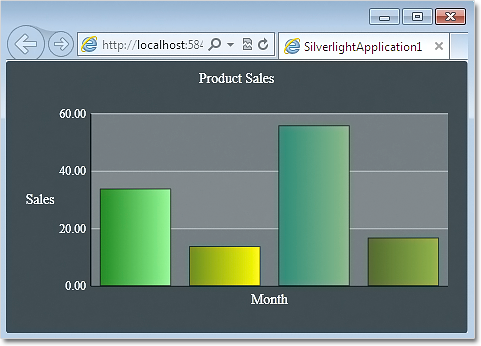
The green theme applied at a bar chart in Silverlight.

The green theme applied at a bar chart in Silverlight.

Better Design Time Support

Charting for Silverlight lets you now edit all collection properties – like series, legends and brushes – in the property grid. In addition we have added converters that let you edit label and data collection in XAML.

Axis Intervals

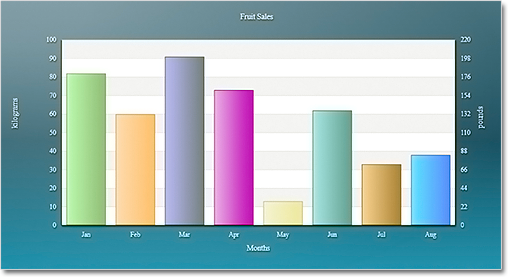
The new AxisSettings.IntervalCount property lets you specify the count of intervals at the numeric axis. When IntervalCount is set, the Interval property is not considered and the axis is calculated based on AxisSettings.Min, AxisSettings.Max and AxisSettings.IntervalCount.

A bar chart with two Y-axes.

A bar chart with two Y-axes.

API Changes

There are a number of changes in the control’s API mainly the type of some properties that were collections is changed to accommodate the new design-time features. Check the “What’s New in This Release” section in the control’s documentation for further details.

You can find out more about the new release at the news page in the Charting for Silverlight section on our forum. The trial version is available for download from here:

Charting for Silverlight 1.2 Trial Version Download

You are welcome to contact us with any questions, problems or inquiries about the control or any other of our products. You can use the discussion board, the help desk or the contact form. MindFusion has always put special emphasis on providing excellent customer support and we usually answer your questions within hours of receiving them.

About MindFusion.Charting for Silverlight: A programming component that combines powerful charting capabilities with a simple API and easy use. Among the features of the control are fully customizable grid, multiple legends, positive and negative values on all chart axes, second X and second Y axis, gauges and many more – read them here.

The control provides detailed documentation and many different samples that show how to customize it. It supports all major chart types – bar, line, radar and pie, as well different modifications of them – column, doughnut, polar, area charts etc. Licenses are counted per user, distribution is royalty free. Each license guarantees full technical support. The source code is also available.

Diagramming for WinForms V.6.0.3

MindFusion has just released a new version of its popular Diagramming component for WinForms. The new features are mostly requested by the users. Here is a list:

ContainerNode Improvements

  • Each container now draws its child nodes. When containers overlap, the children of the lower container can’t appear above the children of the upper container any more.
  • The ClipChildren property indicates whether to clip child items to container’s boundaries
  • The ZIndex property no longer changes automatically when dropping nodes into a container
  • and more
Container nodes

Container nodes

PdfExporter Improvements

  • Clip regions are handled better in custom drawing code
  • PDF shadings now include all colors from a ColorBlend
  • More precise character width when text includes both eastern glyphs and Latin characters.
  • and more.

New events

  • The SetSelfLoopShape event is raised when a link becomes a self-loop, giving you a chance to set a custom shape for the link.
  • The QueryAlignTarget event is raised to determine if a node should be used as alignment guide target when AutoAlignNodes is enabled.
Differently formatted text.

Differently formatted text.

As well other new properties, methods and features – you can read the full list here.

A trial version of the component is available from this link:

Diagramming for WinForms 6.0.3

If you have questions or run into problems using the component you can use the Diagramming for WinForms forum, the help desk or write us at support@mindfusion.dev. Our support team will be pleased to help you.

About MindFusion.Diagramming for WinForms: A programming component that provides any WinForms application with a full set of features for creating and customizing all types of diagrams, flowcharts, schemes, hierarchies, trees, graphs etc. The control provides numerous ways to save and load a diagram, six auxiliary controls and more than 10 automatic graph layout algorithms. Diagram elements include scrollable tables, container nodes, multi-segment arrows, custom diagram item types and many more. Further details here.

Diagramming for WinForms is a royalty-free component, clients get 12 month upgrade subscription when buying a license. The source code is also available for purchase. Visit the buy page for a list with the current license prices.

Diagramming for ASP.NET MVC 1.5

A new version of MindFusion diagramming tool for ASP.NET MVC is released. Here is a list of the new features:

Node Effects

You can now apply two visual effects – the GlassEffect and AeroEffect to nodes. To apply an effect,
you must create an instance of the GlassEffect or AeroEffect classes, adjust its properties and add the instance to the Effects collection of the node. You should use Diagram.NodeEffects if you want to apply the effects on all nodes. Effects can be applied at any time and this will immediately affect the
appearance of the diagram. You can apply more than one effect of the same type as well effects of
different types simultaneously.

Sample themes for your diagrams.

Sample themes for your diagrams.

Radial Gradients

You can set gradient brushes for nodes with the setBrush method. If your gradient blends only two
colors, you can use the color1 and color2 fields to specify them. For more colors you have colorStops.

Multiple Labels per Link

Use the LinkLabel class to set multiple captions on a single DiagramLink object. Link labels provide a set of properties that allow full customization of their appearance and position. Labels support automatic arrangement to avoid overlapping nodes and other labels – set LinkLabel.AutoArrange to true.

A network chart.

A network chart.

New Events

As well other new methods and features. Read the full list at the news page on the MvcDiagram forum
section.
The trial version of the new release is available for download from the following link:

Download MindFusion.Diagramming for ASP.NET MVC 1.4

Technical Support

If you have any questions about Diagramming for ASP.NET MVC you can post them at the forum, the
help desk, or per e-mail at support@mindfusion.dev. Excellent customer support is one of MindFusion top
priorities and we try to provide competent and detailed answers to your questions within hours of
receiving them.

About Diagramming for ASP.NET MVC Component: It is a multi-purpose diagramming tool that consists of
two parts: a .NET class library running on the server and a client side control implemented in JavaScript.

The server side .NET library implements a flow-diagramming object model that lets you define structures
such as trees, flowcharts and graphs. Every element in the diagram is easily accessible and the whole
diagram is rendered as part of an HTML page by just calling the DiagramView extension method.

On the client the diagram is rendered by a DiagramView JavaScript control that draws its content on an
HTML Canvas. The user is able to add nodes and links simply by drawing them with the mouse. There is
also a NodeListView control, which lets users create new nodes via drag and drop.

MvcDiagram also supports various automatic layout algorithms that will make every diagram easy to
understand and beautiful to look at. The diagram can also be easily serialized in binary or XML format.
Exporting is done in a variety of formats including Pdf, Svg, Visio and more. You can read details about
the components at the MvcDiagram features page.

Diagramming for WinRT Beta Version

We have almost finished the initial release of MindFusion.Diagramming component for WinRT. The release
implements most of the API of the MindFusion.Diagramming for Silvelright component. You can read the online reference here:

Diagramming for Silvelright Online Reference

MindFusion.Diagramming for WinRT

MindFusion.Diagramming for WinRT

The Magnifier and Overview controls as well the printing functionality are currently not supported.
Single-touch events are equivalent to mouse input in the Silverlight control. Additionally, the WinRT library implements the following multi-touch gestures:

  • dragging two fingers in same direction over a node translates it
  • dragging two fingers in opposite directions over a node scales and/or rotates it
  • dragging two fingers over an unoccupied point pans the diagram

If the diagram is inside a ScrollViewer, multi-touch gestures are handled only if the ManipulationMode property is set to None; otherwise they are intercepted by the parent ScrollViewer control.

When adding references to the MindFusion.* assemblies, their accompanying resource folders (MindFusion.Diagramming and MindFusion.Diagramming.Controls) must be in the same location as the dll files. If copying or moving the diagramming.dll assemblies, you must also copy these folders in order for Visual Studio to discover the necessary resources.

You are welcome to download and test the beta version:

MindFusion.Diagramming for WinRT Beta Version

Your feedback is highly appreciated. You can write your reviews at the forum or at support@mindfusion.dev.
Thank you.