Diagramming for WPF, V.3.0.4 and Diagramming for WinForms, V.6.1.1

MindFusion has released new versions of two of its diagramming components – Diagramming for WPF and Diagramming for WinForms. The new features in both controls are identical – here is an overview of them:

Import of Visio 2013 files

The new Visio2013Importer class imports .vsdx files, created by Microsoft Visio 2013. The class is part of the MindFusion.Diagramming.Wpf.VisioImport.dll assembly (for WpfDiagram) and the MindFusion.Diagramming.Import.Visio.dll assembly (for FlowChart.NET) – make sure you reference the correct assembly according to your platform. The Import method has different overloads that let you import the Visio file into a single Diagram, whose content is merged from all Visio pages or into a DiagramDocument, whose pages correspond to the Visio drawing pages.

The importer creates a MindFusion.ShapeNode object for each shape from the .vsdx file and sets its Shape, Text, Brush and Pen properties to match the original shape as closely as possible. Each Visio connector shape is represented by a DiagramLink object, whose Origin, Destination and ControlPoints properties preserve the location and appearance of the original shape.
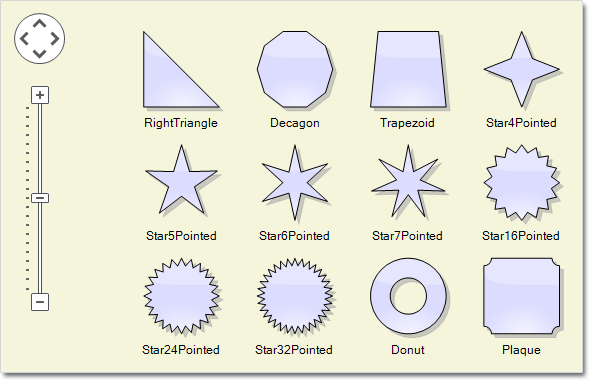
The Zoom control and the new Visio 2013 shape nodes

The Zoom control and the new Visio 2013 shape nodes

Zoom control

The new ZoomControl class lets you change interactively the zoom level and scroll position of any Diagram or DiagramView object. Its usage is very simple – just drag the ZoomControl and place it anywhere over the target diagram, then set the control’s Target property to that diagram or view. The ZoomStep and ScrollStep properties let you customize the amount added to the control’s zoom level or scroll position when the user clicks the control buttons. The appearance of the control is customized with the Fill, Stroke, CornerRadius and TickPosition properties.

New features added to the MindFusion.Diagramming for WPF component:

  • Users can rename a DiagramPage interactively by clicking its tab. This is done with the new AllowRenamePages property of TabbedDiagramView.
  • New shapes have been added for better Visio 2013 compatibility: RightTriangle, Decagon, Trapezoid, Star4Pointed, Star5Pointed, Star6Pointed, Star7Pointed, Star16Pointed, Star24Pointed, Star32Pointed, Donut, Plaque.
  • The PdfExporter now supports DefaultEncoding and AutoDetectEncoding properties.
  • More new features – check the full list here: http://mindfusion.dev/Forum/YaBB.pl?num=1389798301
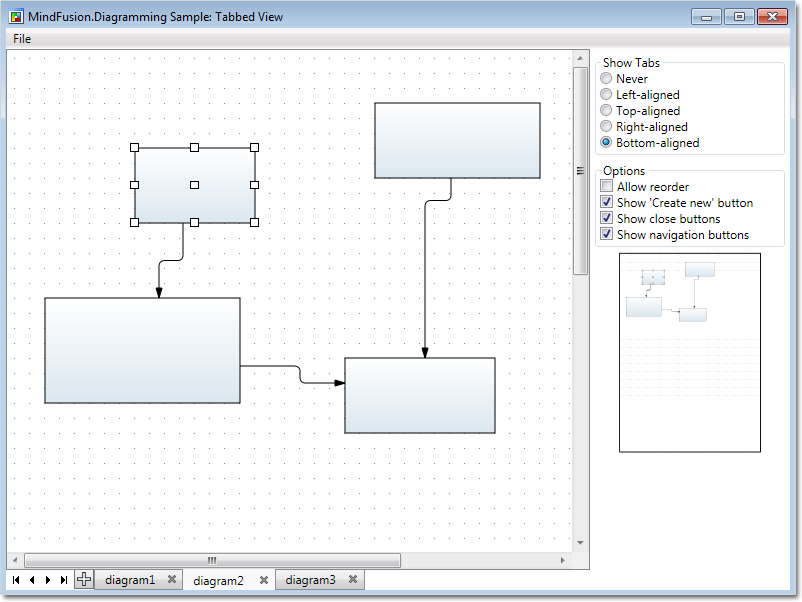
Tabbed view in the WinForms component

Tabbed view in the WinForms component

New features added to the MindFusion.Diagramming for WinForms component:

  • You can change the active page in the TabbedDiagramView control with the arrow buttons
  • You can rename interactively the title of a DiagramPage by clicking the active tab in the TabbedDiagramView control.
  • New shapes have been added for better Visio 2013 compatibility: RightTriangle, Decagon, Trapezoid, Star4Pointed, Star5Pointed, Star6Pointed, Star7Pointed, Star16Pointed, Star24Pointed, Star32Pointed, Donut, Plaque.

The trial versions of the components are available for download from these links:

Download Diagramming for WinForms, Version 6.1.1

Download Diagramming for WPF, Version 3.0.4

If you require technical support, please contact MindFusion support team per e-mail or phone. You can also use the forum or help desk. All support inquiries are answered within hours of receiving them.

About MindFusion.Diagramming for Wpf: Designed and developed to be easy to integrate, use, and customize, this native WPF component places at your disposal every single feature you would ever need to create flowcharts, diagrams, graphs, schemes, DB relationships, trees and many more. Its long list of style options gives you complete control over the appearance of the diagram. With a set of eight automatic layouts you are sure to choose the best arrangement for your items and make the diagram easy to comprehend.

The control boasts a long list of events, properties and methods for user interaction, item creation, data input and output. You can read the full features list here. The online demo shows samples that demonstrate various capabilities of the control. The licensing scheme and prices are uploaded at the buy page. Source code is also available.

About MindFusion.Diagramming for WinForms: A programming component that provides any WinForms application with a full set of features for creating and customizing all types of diagrams, flowcharts, schemes, hierarchies, trees, graphs etc. The control provides numerous ways to save and load a diagram, six auxiliary controls and more than 10 automatic graph layout algorithms. Diagram elements include scrollable tables, container nodes, multi-segment arrows, custom diagram item types and many more. Further details here.

Diagramming for WinForms is a royalty-free component, clients get 12 month upgrade subscription when buying a license. The source code is also available for purchase. Visit the buy page for a list with the current license prices.

MindFusion.Diagramming for JavaScript 1.7

MindFusion has released a new version of its Diagramming component for JavaScript. Here is an overview of the most important new features:

Adjustment handle styles

You can customize the appearance of nodes’ adjustment handles with the new setHandlesStyle method. There are various styles to choose from, including round and square handles, dashed and hatched frames, some combinations. It’s also possible to set what part of a node can be dragged to move or resize it. Custom handles are also supported.

Node anchor points.

Node anchor points.

Dynamic links

When you drag a dynamic link, its end segments are automatically adjusted to point to the center of the target node. If the AnchorPattern property of the node is set, the link ends will align to the closest anchor point instead. Positions of the link’s end points are also updated when the next-to-last control points are being modified.

ContainerNode enhancements

Miscellaneous

  • The Dirty flag is automatically set when a serializable property of an item or the diagram has been modified. It lets you determine where there are any changes that need to be saved.
  • The AdjustmentHandlesSize property specifies the size of adjustment handles.
  • The ShowDisabledHandles property controls whether disabled adjustment handles are drawn on screen.

The trial version of the new Diagramming for JavaScript release is available for direct download from the following link:

Download MindFusion.Diagramming for JavaScript Library 1.7

We have always taken special effort in providing quality technical support to all our clients and evaluators. You can write us at e-mail support@mindfusion.dev or use the help desk. You can use the JsDiagram section on MindFusion forum to post questions about the tool.

About Diagramming for JavaScript Library: Written 100% in JavaScript, this tool uses HTML5 Canvas to draw impressive diagrams, schemes, flowcharts, trees and many more. It is browser independent, easy to use and integrate into any web application. JsDiagram supports a variety of predefined node shapes, customizable links, rich event set and many appearance options. The user interaction model includes resizing / moving / selecting and modifying any diagram element.

The tool boasts an elegant API, which is documented in details as well numerous step-by-step guides and tutorials. Various samples are provided to let you learn quickly how to use the most important features of the library – check them here. JsDiagram is not only the perfect choice for creating any type of diagram in the browser – it can also arrange it the way you wish with a mouse click using one of its automatic graph layout algorithms. For more details about the features of the component, please visit the features page.

MindFusion Pack for ASP.NET, V2013.R2

MindFusion has released Pack for ASP.NET, V2013.R2. Here is an overview of the most important new features in the components within the pack:

diagram16x16 MindFusion.Diagramming for WebForms

Import of OpenOffice Draw files

The new DrawImporter class lets you import *.odg files created by the OpenOffice Draw Vector graphics editor. You just need to add a reference to the MindFusion.Diagramming.Import.Draw.dll assembly and are ready to use it. You can use various overloads of the Import method to import the OpenOffice drawing into a DiagramDocument whose pages correspond to the Draw pages, or into a single Diagram whose content is merged from all imported pages.

Import any type of diagram from

Import any type of diagram from an *.odg file

Canvas Mode Improvements

ContainerNode Improvements

  • Child nodes are now drawn by their containers; when containers overlap, the children of a lower container cannot appear in front of the upper container anymore
  • The ClipChildren property specifies whether to clip child items to container’s boundaries
  • The ZIndex property no longer changes automatically when dropping nodes into a container
  • and others

Miscellaneous

  • The MeasureUnit property now supports Centimeter and WpfPoint values. The latter allows loading diagram files saved by WPF and Silverlight versions of the control with their default units.
  • SwimlaneLayout now honors the Anchoring.Keep property value.
  • New line and quote characters in Tag strings are now escaped when passed to client-side click events in ImageMap mode, avoiding script errors.
  • As well a few bug fixes and API changes

chartMindFusion.Charting for WebForms

Themes

Chart themes are now XML files that you can save and load with the SaveTheme and LoadTheme methods. You can use the theme editor tool provided with the control to edit, save and load themes in a fast and intuitive way. The control provides an initial set of 8 predefined themes.

Major/Minor Axis Ticks

Use the new MajorTickLength and MinorTickLength properties to divide a chart axis in a more precise and accurate manner. The number and pen for the ticks are set with MinorTicksPerInterval, MajorTickPen and MinorTickPen.

Major and minor axis ticks

Major and minor axis ticks

ToolTips

You can apply tooltips on all chart types. Area charts in particular can show a different tooltip for every region between two adjacent data points.

Interactive Editing of Data

Line and bar chart elements can be dragged with the mouse. Bars can be dragged either in horizontal or vertical direction according to their orientation. Line chart points can be dragged in any direction. The dragging behavior is set with the Behavior property.

As well other useful new features.

You can read more about the new features of the components in the ASP.NET Pack at the forum. The new version is available for download from this link:

Download MindFusion Pack for WebForms, VR2.2013

About MindFusion.WinForms Pack: A set of WebForms components that add great variety of features to your ASP.NET application with a few mouse clicks. The pack contains advanced components for diagramming, scheduling, charting and UI (Accordion, ColorPicker, TabControl, Window, WindowHost, DockControl, Button, Slideshow, Zoom and more). Each tool boasts easy to learn and use API and is quickly integrated into any web application that targets the ASP.NET platform. The controls support numerous options for styling, data import / export, user interaction and offer rich event set. There are plenty of samples and step-by-step tutorials as well detailed documentation.

Use the features page for each of the tools to find out more about its capabilities and
the numerous ways it can boost your performance and speed up the development of your application:

Visit the buy page for details on the licensing scheme and prices. If you have questions please contact us. We shall be happy to assist you.

MindFusion.Diagramming for WPF, V3.0.3

We have just released a new version of Diagramming for WPF. It contains the following new features and improvements:

Import of OpenOffice Draw files

You can use the new DrawImporter class to import *.odg files created by the OpenOffice Draw vector graphics editor. There are various downloads of the Import method, which can be used to import an OpenOffice drawing into a DiagramDocument, whose pages correspond to the Draw pages. You can also import your *.odg file into a single Diagram whose content is merged from all imported pages. Currently we support shapes from the General and Flowchart shape palettes in draw. Each shape or link is imported into a ShapeNode or DiagramLink object, whose appearance properties are set to match those of the imported shape/link as precisely as possible.

You can now import your diagrams from OpenOffice Draw files

You can now import your diagrams from OpenOffice Draw files

Display graphs in 3D

You can now display the elements of a diagram in the 3D space with the new DiagramView3D control. The control is very easy to use – just assign the Diagram to be displayed in 3D space to the Diagram property. DiagramView3D adds a 3D model to the scene for each node or link of the specified diagram. By default, nodes always face the camera, unless the NodeRotationType property is set to None.

The new 3D graph viewer

The new 3D graph viewer

Miscellaneous

  • The appearance of hatch patterns used to draw frames for several HandlesStyle types is
    improved
  • You can now load HatchBrush objects from files saved by Windows Forms and ASP.NET versions of the control.

You can download the trial version of the software from this link:

Download MindFusion.Diagramming for WPF 3.0.3

The download contains all runtime libraries of the control, various samples for different .NET versions, extensive desktop documentation and step-by-step tutorials.

If you face difficulties installing or using Diagramming for Wpf, please contact MindFusion support team per e-mail or phone. You can also use the forum or help desk. All support inquiries are answered within hours of receiving them.

About MindFusion.Diagramming for Wpf: Designed and developed to be easy to integrate, use, and customize, this native WPF component places at your disposal every single feature you would ever need to create flowcharts, diagrams, graphs, schemes, DB relationships, trees and many more. Its long list of style options gives you complete control over the appearance of the diagram. With a set of eight automatic layouts you are sure to choose the best arrangement for your items and make the diagram easy to comprehend.

The control boasts a long list of events, properties and methods for user interaction, item creation, data input and output. You can read the full features list here. The online demo shows samples that demonstrate various capabilities of the control. The licensing scheme and prices are uploaded at the buy page. Source code is also available.

Diagramming for WinForms, V6.1

MindFusion has released a new version of its Diagramming component for WinForms. It contains mostly customer requested features. Here are the details:

Support for Mono

You can use now the Diagramming component under the Mono runtime for OSX or Linux. You don’t have to use a different assembly under Mono – a single version of the mindfusion.* assemblies can be referenced by both Mono and Microsoft .NET applications. The control detects the runtime that has loaded it and provides alternative implementations for features that are currently missing from Mono.

FlowChart.NET in Mono

FlowChart.NET in Mono

Custom measure units

The type of the Diagram.MeasureUnit property has been changed from System.Drawing.GraphicsUnit enum to MindFusion.Diagramming.MeasureUnit class. This class lets you define custom units by specifying their dots-per inch resolution, a string name, and number of standard divisions for display in the Ruler control.

The Ruler control

The Ruler control

Shape control points

You can now parameterize Shape formulas by associating control points with Shape objects. Each control point is passed to the shape script as a named variable. Apart from the name, you can specify the default, min and max coordinates for each parameter, and whether to treat its values as percents or fixed offset. Here is an example:
http://mindfusion.dev/Forum/YaBB.pl?num=1376129632

API changes

A trial version of the component is available from this link:

Diagramming for WinForms, V6.1

If you have questions or run into problems using the component you can use the Diagramming for WinForms forum, the help desk or write us at support@mindfusion.dev. Our support team will be pleased to help you.

About MindFusion.Diagramming for WinForms: A programming component that provides any WinForms application with a full set of features for creating and customizing all types of diagrams, flowcharts, schemes, hierarchies, trees, graphs etc. The control provides numerous ways to save and load a diagram, six auxiliary controls and more than 10 automatic graph layout algorithms. Diagram elements include scrollable tables, container nodes, multi-segment arrows, custom diagram item types and many more. Further details here.

Diagramming for WinForms is a royalty-free component, clients get 12 month upgrade subscription when buying a license. The source code is also available for purchase. Visit the buy page for a list with the current license prices.