Scheduling for WinForms, V5.6

We are excited to announce the new release of MindFusion.Scheduling for WinForms. The new version includes:

Visual Studio 2015 Support

The installer of the Scheduling control can create VS2015 toolbox palette for its components.

Interactive Recurrence Rescheduling

You can now reschedule recurrences interactively by holding down the RescheduleRecurrenceKey while dragging a recurrent item. As a truly smart control, MindFusion.Scheduling tries to preserve the current pattern of the recurrence when possible. Otherwise, the recurrence may be modified to accommodate to the new start and end times of the modified item. Note that interactive rescheduling is not registered in the undo history.

New Theme

Bring a touch of fresh spring air to your calendars with the new built-in Light theme. It is available through the ThemeType enumeration.

The new 'Light' theme

The new ‘Light’ theme

New Properties

Scheduling for WinForms offers a few new properties:

  • The new HScrollBarHeight and VScrollBarWidth properties in the ControlStyle class allow you to modify the size of the scrollbars.
  • The RescheduleRecurrenceKey property in the Calendar class can be used to modify recurrences interactively.
  • The RotateGroupHeaderTexts property in the ListViewSettings class can be used to rotate the resource names in the group headers.
  • GroupHourCount, HourFormat and TimelinePadding added to the TimetableSettings class.

MindFusion.Scheduling as a NuGet Package

The component is also available on Nuget. To install the component, run the following command in the Package Manager Console:

PM> Install-Package MindFusion.Scheduling

The trial version of the control is available from the link below:

Download MindFusion.Scheduling for WinForms 5.6

If you have questions about the component, please use the support e-mail or the help desk. MindFusion takes special efforts in providing fast and competent answers to all support inquiries we receive.

About MindFusion.Scheduling for WinForms: MindFusion.Scheduling for WinForms is a programming component that adds to your .NET application powerful features for creating and customizing any type of schedule, calendar, time table, resource table and many more. The tool supports six data views, input/output from/to a variety of data sources and rich user interaction model. Scheduling for WinForms offers various auxiliary forms for creating and editing appointments, tasks and events. A theme editor for creating custom themes is also available. The control features a rich variety of predefined themes and various item effects.

You can read more about Scheduling for WinForms at its features page. Visit the gallery page to see screenshots of various calendars and schedules created with the tool. For more information about licenses and prices go to the buy page.
Spreadsheet for WinForms, V1.4

MindFusion is happy to announce the Scheduling for WinForms, V1.4 is out. Here is a list of the new features:

Licensing

Spreadsheet for WinForms is the next MindFusion component that no longer has separate trial build of the control assemblies. Instead, set its LicenseKey property to disable the evaluation mode and stop displaying trial messages. If your application contains more than one control by MindFusion, you could call MindFusion.Licensing.LicenseManager.AddLicense(key) to specify the key once instead of setting it per each control. License key strings are listed on the Keys & Downloads page at MindFusion’s customer portal. Don’t forget to add a reference to the MindFusion.Licensing dll if it’s not already present in your project.

Visual Studio 2015 support

MindFusion.Spreadsheet for WinForms now includes support for Visual Studio 2015. The installer can create VS2015 toolbox palette for the component.

Autofiltering

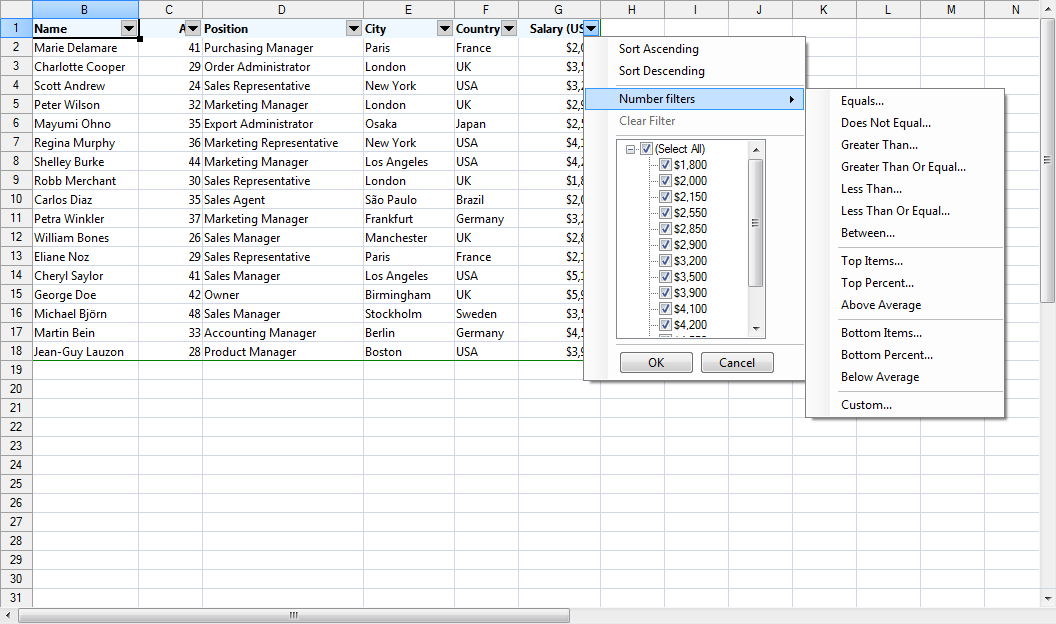
Worksheets now support autofiltering. To enable it, just call the AutoFilter method of the CellRange class. You can specify autofiltering criteria for individual columns with the the AutoFilter overload. You also have the convenience to specify these criteria interactively, through the drop-down buttons inside the headers of each column in the target range.

Spreadsheet for WinForms: Auto Filtering

Spreadsheet for WinForms: Auto Filtering

Multiple Selection

Extend the functionality of your WinForms spreadsheet application by allowing users to select multiple cell ranges. You can

    • even add cell ranges interactively, by holding down the CTRL key while dragging with the mouse. You can also do it programmatically, by using one of the new methods of the Selection class: Add, AddRow, and AddColumn.
Spreadsheet for WinForms: Multiple Selection

Spreadsheet for WinForms: Multiple Selection

Miscellaneous

      • The new EnableTypeInference property can be used to suppress automatic type inference in the workbook.
      • The tooltips displayed when the user resizes rows and columns can now be turned off through the ShowResizeHeaderToolTips property. The format of these tooltips can be specified through the ResizeColumnToolTipFormat and ResizeRowToolTipFormat properties.

You can download the trial version from the link below:

Download MindFusion.Spreadsheet for WinForms V1.4 Trial Version

If you require technical support, you can post a message at the forum, send us an e-mail at support@mindfusion.dev. or use the help desk. MindFusion takes special effort in providing fast and detailed answers to all inquiries that we receive.

About MindFusion.Spreadsheet for WinForms: An easy-to-use programming component suitable for building all types of spreadsheets fast and easy. The tool supports formulas, tool-tips, cell annotations, cell spanning, scrolling and many more. You can add charts and images as well use the flexible style system to design the perfect spreadsheet. The component supports full undo and redo as well copy and paste from Windows clipboard.
You can import spreadsheet data from CSV, XLSX or ODS files and export the final spreadsheet in a number of formats – as images, PDF or CSV, XLSX or ODS files. Various auxiliary forms help you quickly adjust the data and appearance of your spreadsheet. Read more about the features of the component here or check the license prices at the buy page.

Spreadsheet for WinForms is part of MindFusion Pack for WinForms, which offers other useful components that are of great use when you build any type of WinForms application – from a diagramming library to map control to gauges: check them here.

Scheduling for Silverlight, V3.3.2

We are happy to announce the new version of the Scheduling for Silverlight library. Here is an overview of the new features:

Licensing

MindFusion no longer maintains separate trial build of the control assemblies. Instead, set the LicenseKey property of the individual components to disable the component’s evaluation mode and stop displaying trial messages. If your application contains more than one control by MindFusion, you could call MindFusion.Licensing.LicenseManager.AddLicense(key) to specify the key once instead of setting it per each control. License key strings are listed on the Keys & Downloads page at MindFusion’s customer portal. Make sure your project has a reference to the MindFusion.Licensing assembly.

Visual Studio 2013/2015 support

The Schedule control now includes support for Visual Studio 2013 and 2015. The installer can create VS2013 and VS2015 toolbox palette for the component.

Improved data grid

You can now customize the cells and headers in the data grid through a set of new properties: CellBorderBrush, CellBorderThickness, HeaderBackground, HeaderBorderBrush, HeaderBorderThickness, HeaderFontSize, HeaderForeground, and HeaderMargin. Use the new ColumnCreating event to replace a grid column with a custom one.

MindFusion Scheduler for Silverlight: The Gantt Chart

MindFusion Scheduler for Silverlight: The Gantt Chart

New Holiday Providers

Enrich your Silverlight application with the new set of five holiday providers, which are now part of the MindFusion.HolidayProviders.dll assembly – AustraliaHolidayProvider, FranceHolidayProvider, GermanyHolidayProvider, RussiaHolidayProvider, and UKHolidayProvider.

MindFusion Scheduler for Silverlight: Holiday Providers

MindFusion Scheduler for Silverlight: Holiday Providers

Improved Timetable view

We have made some API changes to make using the component even easier. The WorkTimeStartHour and WorkTimeEndHour properties have been renamed to WorkTimeStart and WorkTimeEnd respectively and are now of type TimeSpan to allow more flexible work time intervals. In addition, you can now use the new WorkTimeStarts and WorkTimeEnds properties to specify different work time intervals for the different days in the view. The new ColumnHeaderTemplate property lets you customize the column headers by using a DataTemplate object.

Improved WeekRange view

The Week Range view can now display week numbers, similarly to the Single Month view. Use the WeekHeaderPosition property to enable week numbers and customize them with the RotateWeekHeaderTexts, WeekHeaderFormat, WeekHeaderStyle, and WeekNumbersHeaderWidth properties.

Improved Resource view

We have added a new RowHeaderTemplate property for customization of the row headers.

MindFusion Scheduler for Silverlight: The Resource View

MindFusion Scheduler for Silverlight: The Resource View

Miscellaneous

  • New resource and item hit-testing methods: GetItemAt and GetResourceAt.
  • The modifier key to clone items interactively can now be specified through the ItemCloneKey property.
  • New ItemStartModifying event.
  • Various bug fixes.
  • Two new samples – CustomMonthCalendar and CustomTimetableGrid.

See those numerous new features and tons of existing ones in action – download the component’s libraries with samples and documentation from this link:

MindFusion Scheduler for Silvelight, V3.3.2 Trial Version

Your questions, comments and inquiries are welcomed by MindFusion competent and friendly support team. Write us at the forum, Help desk or use e-mail support@mindfusion.dev

About MindFusion Scheduler for Silverlight: MindFusion.Scheduling for Silverlight provides your web application with a host of useful features for creating, customizing, importing and exporting calendars, time tables, appointment schedules. What’s more, the component includes a full-features Gantt chart with an activity chart and a resource chart. Unleash your creativity with the vast set of appearance options and enjoy the freedom to create calendars where every single detail is customizable and can be controlled by you. Implement professional Gantt diagrams and bring project planning features to your web software with a few mouse clicks. The library is packed with many samples, tutorials and extensive documentation to help you started. The licensing scheme is very attractive with various discount options and great savings for multiple licenses as well for small companies – check it here.

Diagramming for WPF, V3.3 Released

We are pleased to announce the new release of our WPF flowchart control. Here is an overview of the new features:

Support for Visio stencils
Your WPF application can now render shapes from stencil files in Visio 2003 XML stencil format (.vsx). You must use an instance of the VisioStencil class to load a stencil file. The Visio shapes are reproduced in the diagram control through VisioNode objects. To associate a Visio stencil shape with the flowchart node, create an instance of the VisioContent class and assign it to the node’s Content property.min

Visio Stencil Shapes

Diagram for WPF Control: Visio Stencil Shapes

Note: The standard shape stencils installed with Visio are copyrighted by Microsoft, and you should not use them in your diagram application. This feature is intended to let you use public domain diagram node stencils, or commercial clipart you have purchased a license for.

License keys
We no longer prepare a separate trial built of the assemblies of the flowchart control. Instead, set the Diagram.LicenseKey property to disable the component’s evaluation mode and stop displaying trial messages. If your WPF application contains more than one Diagram instance or other controls by MindFusion, you could call MindFusion.Licensing.LicenseManager.AddLicense(key) from application start-up code to specify the key once instead of setting it per each control. License key strings are now listed on the Keys & Downloads page at MindFusion’s customer portal.

AnchorPatern improvements

  • The XUnit and YUnit properties allow specifying the coordinates of an AnchorPoint as a fixed offset from the node’s top-left corner rather than in percentage, so that the point position does not change when the node is resized.
  • The AnchorPattern property of the Shape class lets you associate anchor points with shape definitions. If a ShapeNode instance does not contain its own AnchorPattern, it will derive the one defined by the node’s Shape.
  • TableNode.RowAnchorPattern property lets you specify default AnchorPattern for all table rows.
Diagram Node anchors.

MindFusion WPF Flowchart Library: anchor points for diagram nodes

You can download the trial version of the software from this link:

Download MindFusion.Diagramming for WPF 3.3

The download contains all runtime libraries of the control, various samples for different .NET versions, extensive desktop documentation and step-by-step tutorials.

If you face difficulties installing or using Diagramming for Wpf, please contact MindFusion support team per e-mail or phone. You can also use the forum or help desk. Most support inquiries are answered within hours of receiving them.

About MindFusion.Diagramming for Wpf: Designed and developed to be easy to integrate, use, and customize, this native WPF flowchart component places at your disposal every single feature you would ever need to create diagrams, graphs, schemes, org charts, DB relationships, genealogy trees, class hierarchies and many more. Its long list of style options gives you complete control over the appearance of the diagram. With a set of eight automatic layouts you are sure to find the arrangement that suits perfectly your WPF application.

The diagram control boasts a long list of events, properties and methods for user interaction, item creation,
data input and output. You can read the full features list here. The online demo shows samples that demonstrate various capabilities of the control. The licensing scheme and prices are uploaded at the buy page. Source code is also available.

Diagramming for Android, V1.2

We are happy to announce the new version of MindFusion.Diagramming library for Android. We have added the following new features and improvements:

AnchorPattern improvements

  • The XUnit and YUnit properties allow specifying the coordinates of an AnchorPoint as a fixed offset from the node’s top-left corner rather than in percentage, so that the point position does not change when the node is resized.
  • The AnchorPattern property of Shape class lets you associate anchor points with shape definitions. If a ShapeNode instance does not contain its own AnchorPattern, it will derive the one defined by the node’s Shape.
Android diagramming library: anchor points

Android diagramming library: anchor points

Miscellaneous

  • Links can now snap to nodes from a distance when their AutoSnapToNode property is enabled. The maximum snap distance is specified via Diagram.AutoSnapDistance property. AutoSnapToNode supersedes the old SnapToNodeBorder property, which worked only for nodes under pointer location.
  • Type of Margin property of LinkLabel has been changed from float to Thickness.
  • The changeUnit method sets a new MeasureUnit and scales the coordinates of diagram items to keep them the same size.
  • Fixed node spacing in bottom-to-top TreeLayout.
  • Multiple-resize of rotated nodes fixed to apply same offsets in nodes’ local coordinate system.
  • Fixed text layout in rotated nodes.
  • Improved layout of text components in CompositeNode.

The new version is available for download from the following link:

Download Diagramming for Android, V1.2

If you require technical support, please use the forum or write us at support@mindfusion.dev. A help desk is also available. Providing fast and competent technical support is among the priorities of MindFusion. We answer most support inquiries within hours of receiving them.

About Diagramming for Android: A native Java class library, which provides your Android application with a powerful set of features for creating, customizing and displaying flowcharts, genealogy trees, class hierarchies, networks, algorithms and much more. The component offers a rich choice of predefined shapes, many pen and brush options as well HTML-like formatting of text. Diagram nodes can hold text as well images, can be semi-transparent and support glass reflection effects. The component offers various automatic layout algorithms and a rich user interaction model, which supports zoom, scroll, alignment guides and more. You can read the features list of MindFusion Diagramming library for Android here. For pricing and licenses check this link.