We have released MindFusion.WinForms Pack 2026.R2. It adds following new features and improvements:
 MindFusion.DiagrammingAuto-routing improvements
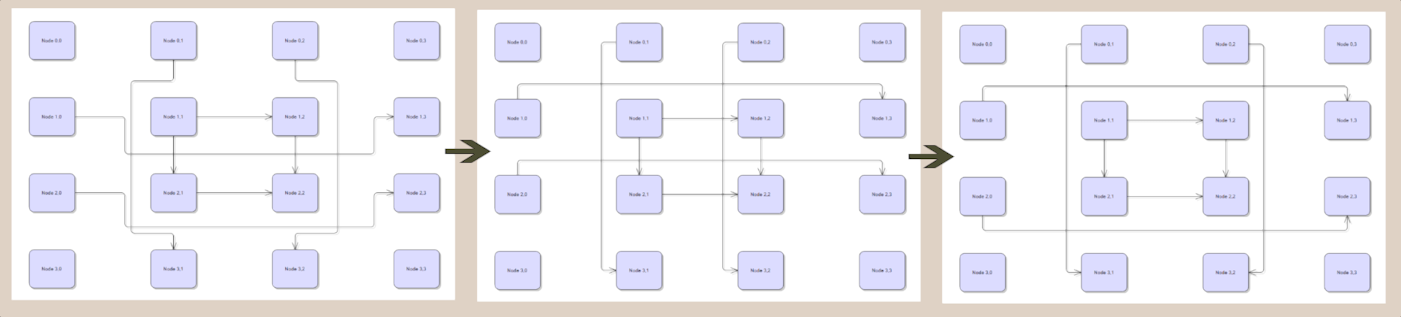
- Enable the MinimizeCrossings property of PatternRouter to make it select routes with fewer crossings. Note that this adds an additional loop to the algorithm, which may affect performance for large diagrams.
- New EvaluateFarPoints property of RoutingOptions, considered by PatternRouter and GridRouter, selects the best route from the possible start/end point combinations of the link's incident nodes. Note that this adds an additional loop to the algorithms, which may affect performance for large diagrams.
- Set the MinLinkSpacing property of CompositeRouter to specify the padding between nearby links.
- This screenshot demonstrates the effects of EvaluateFarPoints and MinimizeCrossings properties:
 Custom lasso tools
If you set the Behavior property of DiagramView to DrawLasso, the control lets users draw selection lasso without changing actual Selection. You could use that in conjunction with InitializeLasso and LassoDrawn events to implement custom tools or selection logic, such as:
- Opening a custom context menu or UI panel styled for bulk operations.
- Creating a visual screenshot / export of only the selected region.
- Implementing custom selection logic or filters (e.g. select nodes of a specific type, or select only links).
- Bookmarking the selected area (adding it to Bookmarks).
Serialization improvements- Json element added to SaveToStringFormat enumeration, and can be used with SaveToString and LoadFromString methods.
- For naming consistency with XML serialization methods, JSON methods (SaveToJsonFile, SaveToJsonObject, etc) have been renamed to SaveToJson and LoadFromJson, along with corresponding async versions.
- SaveToJson and LoadFromJson methods added to DiagramView, which also save view state (scroll position and zoom level).
- JSON serialization methods extended to provide full set of Stream overloads.
- XML serialization methods extended to provide full set of Stream overloads (previously missing altogether from DiagramDocument and missing async versions in Diagram).
- AutoDeleteItems now saved in JSON format.
- The Brush of DiagramItem.Pen is now saved in JSON format (fix for hatch pens getting reloaded as solid-color ones).
- LaneGrid cell border styling now saved in JSON format.
- LaneGrid header fonts now saved in JSON format.
- The order of OutgoingLinks and IncomingLinks is now preserved in JSON format.
API changes- Attention: LoadFromJson(string) parameter now specifies file name. Call LoadFromString to load from JSON data string instead. Replace SaveToJson -> String calls with SaveToString(SaveToStringFormat.Json);
- SaveToJsonFile and SaveToJsonObject replaced by SaveToJson overloads.
- LoadFromJsonFile and LoadFromJsonObject replaced by LoadFromJson overloads.
- ZoomBehavior class renamed to LassoBehavior (it now implements both DrawLasso and Zoom behaviors).
 MindFusion.SpreadsheetWhole-column and whole-row references
Formulas can now reference entire columns, such as =SUM(A:B), or entire rows, such as =SUM(1:5).
- Relative, absolute, and mixed references are supported (A:C, $A:$C, 1:5, $1:$5).
- Cross-sheet whole-range references are supported, e.g. =SUM(Sheet2!A:B).
- The calculation engine and lookup functions (VLOOKUP, HLOOKUP, LOOKUP, XLOOKUP) have been optimized to leverage sparse cell storage, efficiently evaluating whole-range references without iterating over empty cells.
- In-place formula editing and the formula bar now highlight whole-column and whole-row ranges in matching colors on both the text editor and grid view.
- Relative whole-range references are automatically refactored during cell copy, paste, and insert / delete operations.
New chart typesThe ChartType enumeration and spreadsheet drawing layer have been expanded with several new chart types (demonstrated in SpecialtyCharts sample project):
- Heatmap: Displays 2D data intensity maps using a grid layout, supporting 3 or 4 values per data element (X, Y, intensity, and optional radius) as well as data labels.
- Funnel: Visualizes progressive process stages, showing proportional segment sizes and inner stage labels.
- Tower: Displays event sequences and comparisons side by side using stacked rectangular segments with inner data label support.
Miscellaneous- The built-in ChartForm dialog now uses a selection list for chart categories, providing support for all newly introduced chart types and subtypes.
 MindFusion.ChartingGrid heatmaps
The HeatmapChart control and HeatmapRenderer can now render heatmaps as a structured grid of cells in addition to the continuous radial gradients. Set the HeatmapLayout property to Grid to partition the plot area into rows and columns defined by GridRows and GridColumns. The color of each grid cell is calculated by interpolating series data using the algorithm specified by Interpolation:
- Accumulative - samples radial falloff intensities at cell centers based on data point coordinates and radius.
- InverseDistance - applies Inverse Distance Weighting (IDW) spatial interpolation from surrounding points.
- NearestNeighbor - assigns the intensity value of the closest data point to each cell.
Grid cell borders can be customized using the ShowGridLines and GridLineColor properties.
Axis interval alignmentThe Axis class now features an automatic "nice number" interval calculation algorithm that snaps auto-calculated intervals to clear, human-readable increments (powers of 10 scaled by 1, 2, or 5) rather than arbitrary decimal fractions:
- The AlignIntervals property (default true) controls whether calculated intervals are rounded to the nearest nice numbers.
- The TargetDivisions property specifies the preferred number of subdivisions across the visible axis span (defaults to 10).
- The read-only EffectiveInterval property exposes the active step size used by AxisRenderer.
MiscellaneousBubbleRenderer and ScatterRenderer now dynamically adjust the measured axis data range to include bubble and scatter shapes, preventing them from clipping at plot edges.Added the OuterLabelOffset property to PieChart, allowing you to customize the distance between outer labels and the pie circle. Virtual KeyboardAutomatic popup extender
The new VirtualKeyboardExtender component provides declarative virtual keyboard auto-show capabilities for Windows Forms applications. When added to a form, it implements IExtenderProvider to expose design-time properties on all input controls, enabling the virtual keyboard to automatically pop up on focus and hide when focus leaves:
- AutoShow – enables or disables automatic popup display for the target control (or for all child controls when set on the Form).
- LayoutMode – specifies the keyboard layout (Default, Extended, Compact, Numeric3x4, or Numeric4x4) associated with the focused control.
- PopupPlacement – defines the popup position relative to the control (Bottom, Top, Left, Right, FormBottom, or ScreenBottom).
- CustomLayout – allows assigning a custom KeyboardLayout template to specific fields.
The popup uses a non-activating tool window style, ensuring that interaction with the virtual keyboard never steals focus from the active text box. Both physical and on-screen keyboard inputs work simultaneously without focus interruptions.
// Enable automatic popup for all input fields on the form
virtualKeyboardExtender.SetAutoShow(this, true);
virtualKeyboardExtender.SetLayoutMode(this, KeyboardMode.Compact);

// Assign specialized numeric layouts to specific fields
virtualKeyboardExtender.SetLayoutMode(txtUserID, KeyboardMode.Numeric3x4);
virtualKeyboardExtender.SetLayoutMode(txtPhone, KeyboardMode.Numeric4x4);
New standard layoutsThree new built-in keyboard layouts have been added to the KeyboardMode enumeration and can be activated via the Mode property or retrieved as reusable KeyboardLayout templates:
- Compact – a streamlined layout without function keys (F1–F12) or redundant modifiers, ideal for mobile, touch, and compact popup windows.
- Numeric3x4 – a 3×4 telephone-style numeric keypad with 0–9 digits, Backspace, and Clear (C).
- Numeric4x4 – a 4×4 numeric keypad including 0–9, decimal point, minus sign, Backspace, Clear, Tab, and Enter.
// Select a layout mode directly or retrieve preconfigured layout objects
virtualKeyboard.Mode = KeyboardMode.Compact;

// Or use static factory methods for LayoutRing or TemplateLayout
var layout = KeyboardLayout.CompactLayout();
...
Miscellaneous- Added ClearKey class and static Clear property to clear the contents of currently focused input controls.
- Added ForceUpdateLayout method to VirtualKeyboard.
- Automatic password detection: the auto-show popup automatically enables PasswordMode when the target field is a password box.
Installer for the latest version can be downloaded here, or from the
clients area on our site:
https://mindfusion.dev/WinFormsTrial.zipUpdated assemblies are also available as
https://www.nuget.org/packages/MindFusion.Pack.WinForms/ NuGet package.
Enjoy!


 Pages: 1
 MindFusion.WinForms Pack, 2026.R2 (Read 25 times)


