Version 5 of MindFusion JavaScript Diagram contains the following new features and improvements -
PdfExporter classDiagramming.js script now includes a built-in PdfExporter class that allows client-side export of diagram content to Adobe Portable Document Format (PDF) files with zero external dependencies. The exporter generates PDF 1.4 documents containing vector paths representing diagram items, and renders text using the standard 14 PDF fonts. Bitmaps assigned to nodes are encoded in PDF too.
PdfExporter offers layout and pagination properties modeled after our desktop diagramming libraries. Developers can configure standard paper formats via PageSize (A0–A6, B0–B5, Letter, Legal, or custom DiagramSize), adjust PageOrientation (Portrait, Landscape, or Auto), define printable Margins, and apply AutoScale modes (FitToPage, FitToWidth, etc.) or multi-page grid tiling. The export API provides several output options, including exportArray for raw byte arrays, exportBlob for binary streams, and a convenience export(diagram, filename) method that triggers an automated browser download.
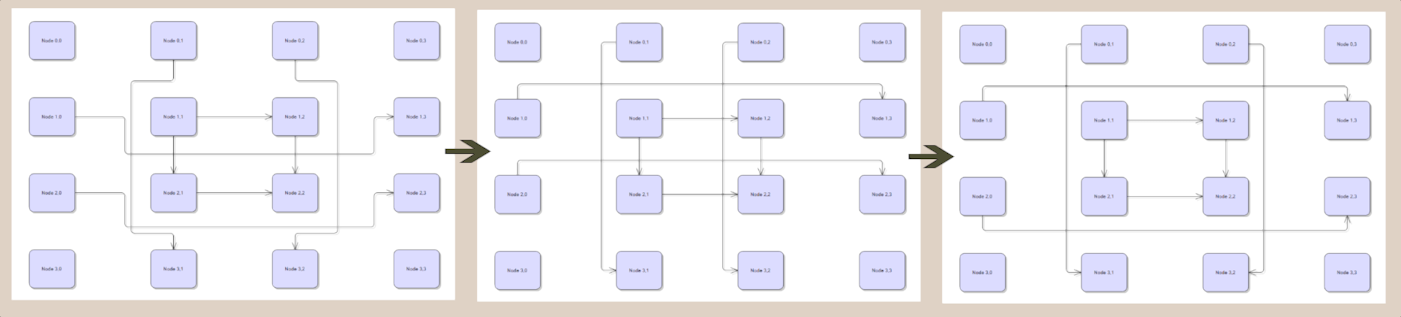
Auto-routing improvements- Enable the minimizeCrossings property of PatternRouter to make it select routes with fewer crossings. Note that this adds an additional loop to the algorithm, which may affect performance for large diagrams.
- New evaluateFarPoints property of the Router class selects the best route from the possible start/end point combinations of the link's incident nodes. Note that this adds an additional loop to the algorithms, which may affect performance for large diagrams.
- Set the minLinkSpacing property of CompositeRouter to specify the padding between nearby links.
- This screenshot demonstrates the effects of evaluateFarPoints and minimizeCrossings properties:
 MiniMap control
MiniMap extends Overview with additional UI, bookmark navigation, and heatmap visulization of diagram topology. A toolbar below the overview area provides inline toggles to filter text, images, analytical heatmaps, and bookmarks. The heatmap layer blends critical topological bottlenecks, such as Articulation Points (single points of failure), Betweenness Centrality (intersection hubs), and Fan-In/Fan-Out convergence zones, with custom activity metrics from new activityLevel property of DiagramItem. The bookmark overlay renders Diagram.bookmarks collection as pins with hover tooltips.
BookmarksThe "bookmarks" array property of Diagram lets you store named locations in the Diagram canvas, represented by DiagramBookmark objects. Call addBookmark and removeBookmark methods to update the array while raising change events. Independent of the underlying graph elements, each bookmark stores coordinates, title, brush, icon, which are persisted with the diagram in XML and JSON formats. These can be used to associate additional metadata with specific sections of flowcharts, floorplans, etc. Bookmarks are rendered automatically by the new MiniMap control, and can also be set as data source of list or grid components as alternative navigational UI.
Custom lasso toolsIf you set the behavior property of DiagramView to DrawLasso, the control lets users draw selection lasso without changing actual Selection. You could use that in conjunction with initializeLasso and lassoDrawn events to implement custom tools or selection logic, such as:
- Opening a custom context menu or UI panel styled for bulk operations.
- Creating a visual screenshot / export of only the selected region.
- Implementing custom selection logic or filters (e.g. select nodes of a specific type, or select only links).
- Bookmarking the selected area (adding it to Bookmarks).
Miscellaneous- displayText and displayImages properties added to Overview control.
- The toJsonObject and fromJsonObject methods of the Diagram class serialize and deserialize a diagram as an object, without converting it to a JSON string. You can use that to include the diagram as part of larger JSON trees.
- Diagram CSS rules can be organized into themes by appending a dot and a theme name to selectors. Set the currentTheme property of ThemeManager (in the MindFusion.Controls namespace or the Controls module) to the desired theme name to automatically redraw the diagram using the new set of rules.
If anyone is interested in trying the beta version, please download this archive containing updated script files:
https://mindfusion.dev/_beta/jsdiagram5.zipUpdated scripts are also available as
@mindfusion/diagramming/v/5.0.0-beta2 NPM package.
Any comments, questions and general feedback are welcome.


 Pages: 1

 Version 5 beta / PDF export preview (Read 205 times)


