We have released version 5.5 of FlowChart.NET. It contains the following new features:
Export to SWF (Adobe Flash) formatSwfExporter creates SWF (Adobe Flash) images from the content of Diagram objects. In order to use this component, add a reference to the MindFusion.Diagramming.Export.Swf.dll assembly to your project. To create an SWF file from a diagram, create an SwfExporter instance and call its Export method, passing a Diagram object as parameter. At this time the diagram is exported as static image; interactivity is planned for next releases.
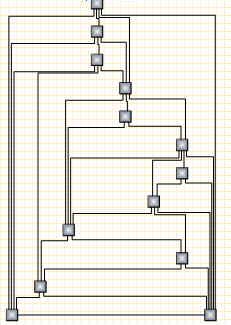
CascadeLayout algorithmCascadeLayout places nodes on a virtual grid and arranges links orthogonally, such that if the source graph is planar all links are guaranteed to have no more than two bends and will not intersect. By default the layout method arranges nodes in rows and link segments in columns; this can be changed by setting the Orientation property.
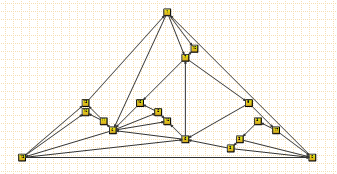
 TriangularLayout algorithm
TriangularLayout places nodes on a virtual grid, such that if the source graph is planar, all links are guaranteed to have a single segment and not intersect. If the graph is not planar, its intersecting links can be optionally segmented and bended in order to improve readability. The layout method places the nodes from the external face on a triangle and recursively adds the rest of the nodes as vertices of internal triangles. As a result, it is very effective for near maximal-planar (a.k.a. triangular) graphs.
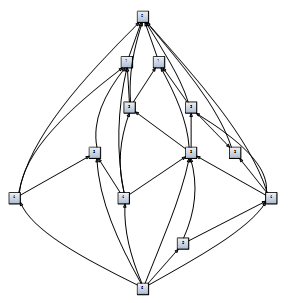
 HierarchicalLayout algorithm
HierarchicalLayout places nodes on user-defined levels, such that if the source graph is level-planar, all links are guaranteed to have a single segment and will not intersect. A graph is considered level-planar if it is possible to draw it without link intersections when its nodes are positioned on predefined levels. The layout method requires that for each node LayoutTraits contains a HierarchicalLayoutTraits.Level entry specifying the level, and no two connected nodes must be on the same level.
 Miscellaneous
~ AddManipulator and RemoveManipulator can be used to associate custom Manipulator objects with items.
~ Radius of link crossing decorations can be set individually per link via the CrossingRadius property.
~ OrthogonalLayout results have been greatly improved for nonplanar and high vertex-degree graphs.
~ CancelDrag and StartInteraction methods provide greater control over user interaction.
~ To display a custom mouse cursor that does not depend on the current context, set the OverrideCursor property.
Registered customers with an active upgrade subscription can download the licensed version from the
clients area on our site.
A trial version is available for download here:
https://www.mindfusion.eu/FCNetDemo.zip Enjoy!


 Pages: 1
 Diagramming for Windows Forms, V5.5 (Read 1717 times)


