We have released version 2.0 of DiagramLite. It adds the following new features:
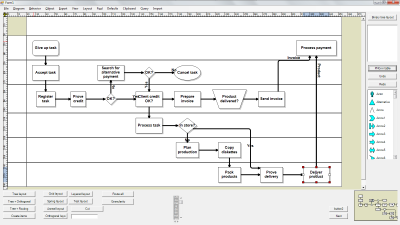
SwimlanesThe lane grid lets you emphasize the relationship between a group of diagram items by displaying them in a distinct lane or cell within the grid. To display the lane grid, set the EnableLanes property of the Diagram class to true. In order to customize the grid, set the various attributes exposed by the LaneGrid property, which lets you specify the number of rows and columns, add headers, customize the cell appearance, etc. The new Lanes sample project uses the lane grid to let users draw Gantt charts.
Swimlane layoutSwimlaneLayout can be used to arrange process diagrams in which nodes representing activities are placed in swimlanes representing resources. The index of the resource allocated to an activity should be assigned to the corresponding node's LayoutTraits[SwimlaneLayoutTraits.Lane].
By default, the algorithm works with the diagram's LaneGrid, but its SwimlaneGrid property can be set to any class that implements ISwimlaneGrid. This allows applying the layout to a custom-drawn grid rendered through a custom control template, or one composed of locked background nodes.
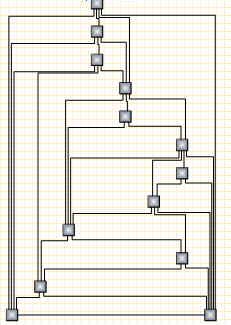
 CascadeLayout algorithm
CascadeLayout places nodes on a virtual grid and arranges links orthogonally, such that if the source graph is planar all links are guaranteed to have no more than two bends and will not intersect. By default the layout method arranges nodes in rows and link segments in columns; this can be changed by setting the Orientation property.
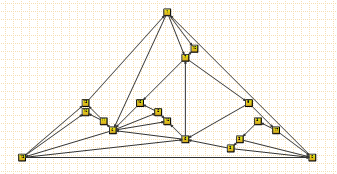
 TriangularLayout algorithm
TriangularLayout places nodes on a virtual grid, such that if the source graph is planar, all links are guaranteed to have a single segment and not intersect. If the graph is not planar, its intersecting links can be optionally segmented and bended in order to improve readability. The layout method places the nodes from the external face on a triangle and recursively adds the rest of the nodes as vertices of internal triangles. As a result, it is very effective for near maximal-planar (a.k.a. triangular) graphs.
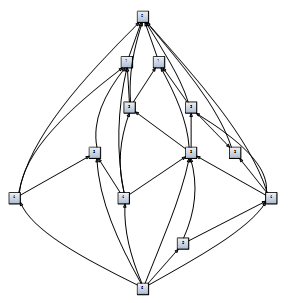
 HierarchicalLayout algorithm
HierarchicalLayout places nodes on user-defined levels, such that if the source graph is level-planar, all links are guaranteed to have a single segment and not intersect. The layout method requires that for each node LayoutTraits contains a HierarchicalLayoutTraits.Level entry specifying the level, and no two connected nodes must be on the same level.
 Miscellaneous
 ~ Windows Phone 7 assemblies included.
~ OrtogonalLayout results have been greatly improved for nonplanar graphs.
~ In-place edit operations for links and the LinkDoubleClicked event are now triggered also when the TextBlock that displays link's label is double clicked. Older versions detected double clicks only over link segments.
~ Gradients set as CaptionBackBrush now fill only the caption bar of a table.
SelectionMoving validation event added.
~ The CancelDrag method allows cancelling draw operations at any time.
~ TextAlignment property added to the Cell class.
~ The Bounds property of nodes is now a dependency property.
~ The KeepInsideParent constraint allows confining a node inside the boundaries of its Container.
~ AllowMoveStart and AllowMoveEnd properties added to DiagramLink.
Registered customers with an active upgrade subscription can download the licensed version from the
clients area on our site.
A trial version is available for download here:
https://www.mindfusion.eu/DiagramLiteTrial.zip ;
Enjoy!


 Pages: 1
 Diagramming for Silverlight, V2.0 (Read 5134 times)


