We are starting beta tests of WpfDiagram 2.5. The new features are:
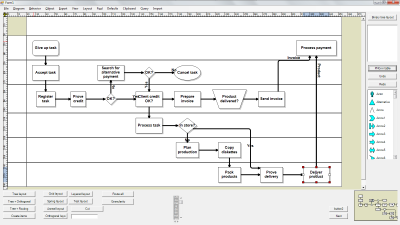
Swimlane layoutSwimlaneLayout can be used to arrange process diagrams in which nodes representing activities are placed in swimlanes representing resources. The index of the resource allocated to an activity should be assigned to the corresponding node's LayoutTraits[SwimlaneLayoutTraits.Lane].
By default, the algorithm works with the diagram's LaneGrid, but its SwimlaneGrid property can be set to any class that implements ISwimlaneGrid. This allows applying the layout to a custom-drawn grid rendered through the DrawBackground event, or one composed of locked background nodes.
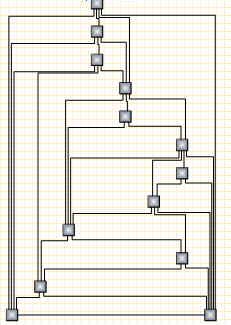
 CascadeLayout algorithm
CascadeLayout places vertices on a virtual grid and arranges edges orthogonally, such that if the source graph is planar it is guaranteed that all edges will have no more than two bends and will not intersect.
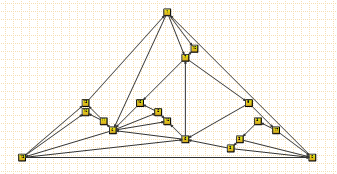
 TriangularLayout algorithm
TriangularLayout places vertices on a virtual grid, such that if the source graph is planar it is guaranteed that all edges will have a single segment and will not intersect. If the graph is not planar, the intersecting edges are optionally segmented and bended in order to improve readability.
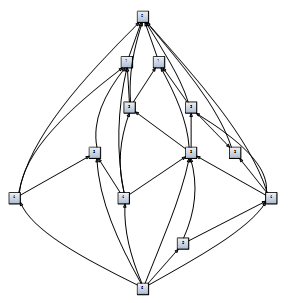
 HierarchicalLayout algorithm
HierarchicalLayout places vertices on predefined levels, such that if the source graph is level-planar it is guaranteed that all edges will have a single segment and will not intersect.
 OrtogonalLayout improvements
OrtogonalLayout results have been greatly improved for nonplanar graphs.
Swimlane extensions~ The lane grid can be printed by setting PrintOptions.EnableLanes = true;
~ The text of lane headers can be edited by the user if LaneGrid.AllowInplaceEdit is enabled;
If anyone is interested in trying the beta, please download this archive, which includes updated assemblies and help file:
https://mindfusion.eu/_beta/WpfDiagram.2.5.zip


 Pages: 1
 WpfDiagram V2.5 beta (Read 6145 times)


