Page Index Toggle Pages: 1 Send TopicPrint
Normal Topic C# Manifest file question (Read 8632 times)
Xarzu
YaBB Newbies
*
Offline


I love YaBB 1G - SP1!

Posts: 2
Joined: Jan 16th, 2008
C# Manifest file question
Jan 16th, 2008 at 4:22pm
Print Post  
Does anyone know how to declare Manifest Files in the Visual Studio IDE for C#?

I followed the steps outlined here for including a manifest file:
http://support.microsoft.com/kb/944276
Does it matter if the manifest file is in the directory where the
source code is or should it be in the directory where the executable
code is?

Someone has suggested I set  BuildAction to "Embedded Resource".  But I cannot find where this is set in the properties.  Can you?  In which panel is the BuildAction?

http://i67.photobucket.com/albums/h292/Athono/CSharp015.png
http://i67.photobucket.com/albums/h292/Athono/csharp016.png
http://i67.photobucket.com/albums/h292/Athono/csharp017.png
http://i67.photobucket.com/albums/h292/Athono/CSharp018.png
http://i67.photobucket.com/albums/h292/Athono/csharp019.png
http://i67.photobucket.com/albums/h292/Athono/csharp020.png

It seems there is more than one way to use Manifest Files with C#.  I would like to know them all.
  
Back to top
 
IP Logged
 
Stoyo
God Member
*****
Offline


MindFusion support

Posts: 13230
Joined: Jul 20th, 2005
Re: C# Manifest file question
Reply #1 - Jan 16th, 2008 at 5:26pm
Print Post  
It is not necessary to embed the manifest as a resource. You can distribute it as a separate file - just name it as your application executable is called + ".manifest", e.g. "project1.exe.manifest".

If you prefer to embed the manifest into the executable, you can do so from the Visual Studio Resource View (Ctrl+Shift+E) as described in the MS KB article.

I hope that helps,
Stoyan
« Last Edit: Jan 17th, 2008 at 6:09am by Stoyo »  
Back to top
 
IP Logged
 
Xarzu
YaBB Newbies
*
Offline


I love YaBB 1G - SP1!

Posts: 2
Joined: Jan 16th, 2008
Re: C# Manifest file question
Reply #2 - Jan 22nd, 2008 at 3:58am
Print Post  
Stoyo wrote on Jan 16th, 2008 at 5:26pm:
It is not necessary to embed the manifest as a resource. You can distribute it as a separate file - just name it as your application executable is called + ".manifest", e.g. "project1.exe.manifest".

If you prefer to embed the manifest into the executable, you can do so from the Visual Studio Resource View (Ctrl+Shift+E) as described in the MS KB article.

I hope that helps,
Stoyan


How do I declare a manifest file in the Visual Studio IDE for C# so that I can debug the resulting code?

I have been able to add the manifest file, to the exe after I have built the program.  But then, when I try to debug my C# code, the program crashes at the point where a function call is made that is used by the DLL that the manifest file calls.

I tried the first in the "How to embed a manifest in an assembly: let me count the ways..." (http://blogs.msdn.com/cheller/archive/2006/08/24/how-to-embed-a-manifest-in-an-a...) link and it failed to produce an executable that I could step through the IDE debugger.  And I followed the steps carefully and I had no build errors.

I followed the steps outlined here for including a manifest file:
http://support.microsoft.com/kb/944276

The executable runs from the command line after I include the manifest file.  But when I open up the debugger and try to run the program through the IDE, it has the same problem as if it does not recognize the manifest file linked to it.

The way I link the manifest file to the executable is by first building the executable and then I close the project.  Then I open the executable as a separate file and then I attach the manifest file as a resource to the executable.

The executable can run then, by running it from an explorer window (command line) but if I open the project again, it will not work.

I got the execuatable produced in the "let me count the ways" to work the same way.  But I need to step through the code.

========
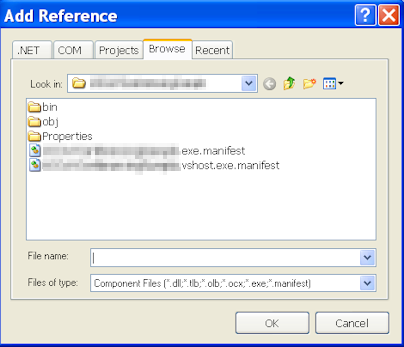
I hear some talk about the vshost.  How does this work?  Do I just rename
the manifest file as vshost and put it in as a resource?


========

Also, what is the Click Once Install method?

========

There is also the BuildAction method which I am going to attempt.

  
Back to top
 
IP Logged
 
Stoyo
God Member
*****
Offline


MindFusion support

Posts: 13230
Joined: Jul 20th, 2005
Re: C# Manifest file question
Reply #3 - Jan 23rd, 2008 at 6:15am
Print Post  
What exactly are you trying to achieve with that manifest file?

The VSHOST is explained pretty well here -
http://blogs.msdn.com/dtemp/archive/2004/08/17/215764.aspx

If you are trying to configure some UAC security settings, indeed running your application through the debugger will probably start in the in the VSHOST security context, which might override your manifest file settings. If that's the case, you can disable VSHOST from the Project Properties page / Debug tab - there uncheck the "Enable the Visual Studio hosting process” option.

The VS ClickOnce wizard will publish your desktop application on a web page where users will be able to run it by clicking on a hyperlink.

I hope that helps,
Stoyan
  
Back to top
 
IP Logged
 
Page Index Toggle Pages: 1
Send TopicPrint