


ListView and ListItem

The ListView control displays a collection of items, which can be arranged vertically or horizontally. The image below shows a vertical list whose items represent people participating in a chat:
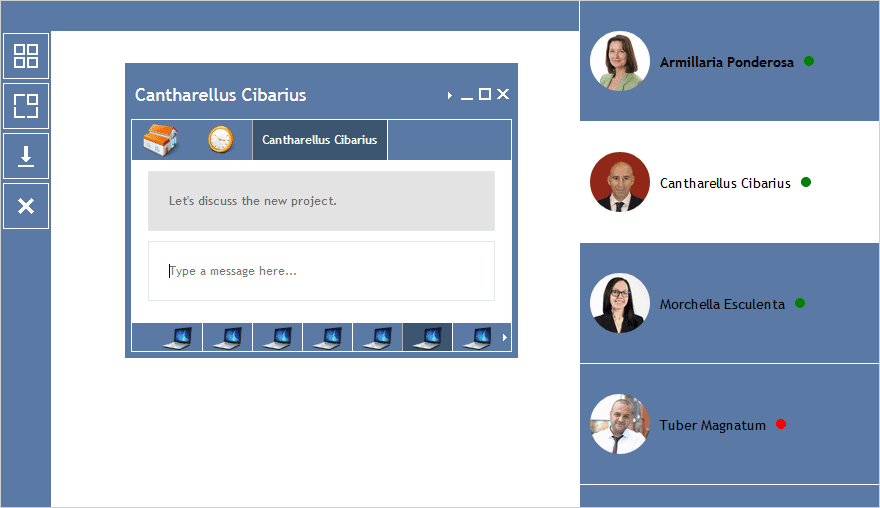
Use view' items property to get a reference to the control's collection of ListItems. Use add and remove methods of the items collection to add and remove list items.
The following code creates a ListView, adds two items and render-s the list:
JavaScript
 Copy Code Copy Code
|
|---|
var ui = MindFusion.UI; var listView; listView = new ui.ListView(document.getElementById("listView")); var item = new ui.ListItem(); item = new ui.ListItem(); listView.render(); |
| HTML
Copy Code
|
|---|
<div style="position: absolute; top: 0px; right: 0px; bottom: 0px; width:300px;"> |
Items can also be created by loading a data object or a JSON string, containing the items data, by using the fromObject and fromJson methods respectively.
| JavaScript
Copy Code
|
|---|
//select the second item in the list |
The orientation property specifies how list items are arranged - vertically (the default), or horizontally.
| JavaScript
Copy Code
|
|---|
listView.orientation = MindFusion.UI.Orientation.Horizontal; |
Depending on the orientation the itemSize property can be used to control either the height (for vertical orientation), or the width of the list items. By default, the control allows selection of multiple items when the Ctrl key is pressed, and this behavior can be turned off through the allowMultipleSelection property.
| JavaScript
Copy Code
|
|---|
listView.allowMultipleSelection = false; |
Drag and drop capabilities are enabled by default, and can be disabled on a control level by setting the allowDrag property to false.
| JavaScript
Copy Code
|
|---|
//disables drag and drop for the whole list |
To disable drag operations only for a specific ListItem, set its interactive property to false.
| JavaScript
Copy Code
|
|---|
//disable drag for this list item only |
The following code attaches an event handler for the itemDoubleClick event:
| JavaScript
Copy Code
|
|---|
listView.itemDoubleClick.addEventListener(handleItemDoubleClick); var t = document.createElement("div"); tip.theme = "peach"; return; |
The items data can be serialized to a JSON string via the toJson method and deserialized from a JSON string via the fromJson method.
| JavaScript
Copy Code
|
|---|
var item = new ui.ListItem(); listView.items.add(item); |