



Represents a window with title and contents, which can be moved, resized and arranged interactively.
Namespace: MindFusion.UI.Wpf
Assembly: MindFusion.Common.Wpf
 Syntax
C#
 Copy Code Copy Code
|
|---|
public class Window : ContentControl, IComparable<Window> |
| Visual Basic
Copy Code
|
|---|
Public Class Window |
RemarksThe Window class can be used is usually use in conjunction with the WindowHost class. The WindowHost class acts as a container of Window objects and enables the interactive functionality of the windows -moving, resizing and so on.
To add a Window to a host, either add it to its Windows collection or call the Show or ShowDialog methods of the Window passing the host as an argument. Since the Windows property is declared as the ContentProperty of the WindowHost, windows can be added to a WindowHost directly in XAML.
ExampleThe Window class can be used is usually use in conjunction with the WindowHost class. The WindowHost class acts as a container of Window objects and enables the interactive functionality of the windows -moving, resizing and so on.
To add a Window to a host, either add it to its Windows collection or call the Show or ShowDialog methods of the Window passing the host as an argument. Since the Windows property is declared as the ContentProperty of the WindowHost, windows can be added to a WindowHost directly in XAML.
The following code illustrates a WindowHost with a single Window defined in XAML:
| XAML
Copy Code
|
|---|
<Window x:Class="WpfApplication.Window2" |
The code above yields results similar to the following picture:
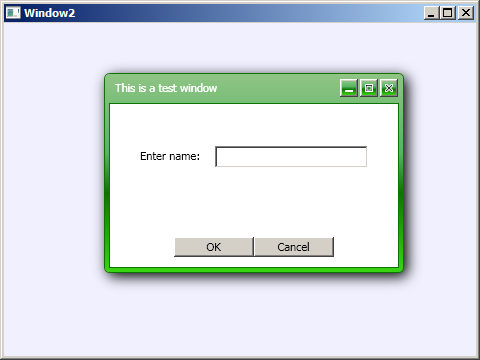
To adjust the position or size of the window programmatically, use the Left, Top, Width and Height properties respectively. To minimize or maximize the window use its WindowState property.
Inheritance HierarchySystem.Object
System.Windows.Threading.DispatcherObject
System.Windows.DependencyObject
System.Windows.Media.Visual
System.Windows.UIElement
System.Windows.FrameworkElement
System.Windows.Controls.Control
System.Windows.Controls.ContentControl
MindFusion.UI.Wpf.Window
See Also