



Represents an advanced button that can optionally display a drop-down panel when clicked.
Namespace: MindFusion.UI.Wpf
Assembly: MindFusion.Common.Wpf
 Syntax
C#
 Copy Code Copy Code
|
|---|
public class MindFusionButton : ContentControl |
| Visual Basic
Copy Code
|
|---|
Public Class MindFusionButton |
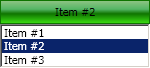
ExampleThe following example illustrates a button with a drop-down ListBox. The content of the button is automatically updated when the items in the drop-down ListBox are selected. The width of the drop-down ListBox is synchronized with the width of the button.
| XAML
Copy Code
|
|---|
<ui:MindFusionButton Name="button" ButtonType="DropDown" Content="{Binding SelectedItem.Content, ElementName=dropdown}"> |
Here is an image illustrating the result:
 Inheritance Hierarchy
System.Object
System.Windows.Threading.DispatcherObject
System.Windows.DependencyObject
System.Windows.Media.Visual
System.Windows.UIElement
System.Windows.FrameworkElement
System.Windows.Controls.Control
System.Windows.Controls.ContentControl
MindFusion.UI.Wpf.MindFusionButton
See Also