



Represents a drop-down control which enables users to select dates and times.
Namespace: MindFusion.UI.Wpf
Assembly: MindFusion.UI.Wpf
 Syntax
C#
 Copy Code Copy Code
|
|---|
public class DateTimePicker : Control |
| Visual Basic
Copy Code
|
|---|
Public Class DateTimePicker |
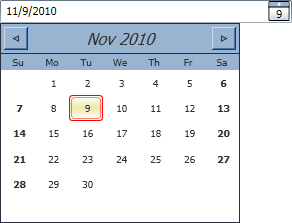
RemarksThe DateTimePicker control enables users to specify dates by either typing the date in a text field or choosing the date from drop-down calendar. The DateTimePicker uses a Calendar control in its drop-down popup. Various of the calendar appearance properties can be specified directly through properties exposed by the DateTimePicker control: CalendarFontSize, CalendarWidth, CalendarHeight as well as all of the formatting and templating properties as described in the Calendar class.
ExampleThe following code demonstrates a DateTimePicker control defined in XAML:
| XAML
Copy Code
|
|---|
<ui:DateTimePicker Height="23" VerticalAlignment="Top" CalendarWidth="240" CalendarHeight="200" /> |
The picker defined above will look similar to the following with its drop-down calendar open:
 Inheritance Hierarchy
System.Object
System.Windows.Threading.DispatcherObject
System.Windows.DependencyObject
System.Windows.Media.Visual
System.Windows.UIElement
System.Windows.FrameworkElement
System.Windows.Controls.Control
MindFusion.UI.Wpf.DateTimePicker
See Also