



Represents a control that can enable users to select colors from a drop-down palette or through a specialized editor.
Namespace: MindFusion.UI.Wpf
Assembly: MindFusion.Common.Wpf
 Syntax
C#
 Copy Code Copy Code
|
|---|
public class ColorPicker : Control |
| Visual Basic
Copy Code
|
|---|
Public Class ColorPicker |
RemarksThe color displayed in the control can be get or set through the SelectedColor property.
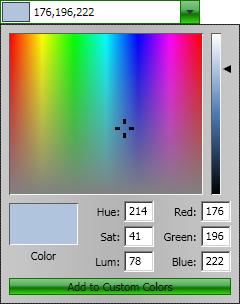
When the drop down panel is initially open, it displays a palette with predefined colors. The user can left-click on any of the colors to select it in the picker. In addition the user can right-click on one of the color boxes to display a custom color editor inside the drop-down panel.
ExampleThe following code illustrates a ColorPicker control defined in XAML:
| XAML
Copy Code
|
|---|
<ui:ColorPicker SelectedColor="LightSteelBlue" /> |
The image below displays the picker with its drop-down open:
 Inheritance Hierarchy
System.Object
System.Windows.Threading.DispatcherObject
System.Windows.DependencyObject
System.Windows.Media.Visual
System.Windows.UIElement
System.Windows.FrameworkElement
System.Windows.Controls.Control
MindFusion.UI.Wpf.ColorPicker
See Also