



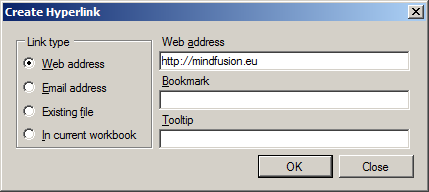
Represents a form which can be used to create and modify cell hyperlinks in a worksheet.
Namespace: MindFusion.Spreadsheet.WinForms
Assembly: MindFusion.Spreadsheet.WinForms.StandardForms
 Syntax
C#
 Copy Code Copy Code
|
|---|
public class HyperlinkForm : Form |
| Visual Basic
Copy Code
|
|---|
Public Class HyperlinkForm |
RemarksThis form can be used to prompt the user for the hyperlink information of a worksheet cell. To use the form, create an instance of the HyperlinkForm class and call the ShowDialog method. The user's choice can be obtained from the Type, Target, SubTarget, and ToolTip properties. The following image shows the form:
 Example
The code below demonstrates how to use the form to edit the hyperlink of an existing cell.
| C#
Copy Code
|
|---|
var form = new HyperlinkForm(cell.Hyperlink); |
| Visual Basic
Copy Code
|
|---|
Dim form = New HyperlinkForm(cell.Hyperlink) |
Inheritance HierarchySystem.Object
System.MarshalByRefObject
System.ComponentModel.Component
System.Windows.Forms.Control
System.Windows.Forms.ScrollableControl
System.Windows.Forms.ContainerControl
System.Windows.Forms.Form
MindFusion.Spreadsheet.WinForms.HyperlinkForm
See Also