



Represents a glass-like visual effect.
Namespace: MindFusion.Scheduling.WinForms
Assembly: MindFusion.Scheduling
 Syntax
C#
 Copy Code Copy Code
|
|---|
public sealed class GlassEffect : ItemEffect |
| Visual Basic
Copy Code
|
|---|
Public NotInheritable Class GlassEffect |
RemarksThis effect can be applied to the elements in a Calendar by adding an instance of this class to the ItemEffects collection.
The following image illustrates the Glass effect applied to an item as well as how the different properties affect the output:
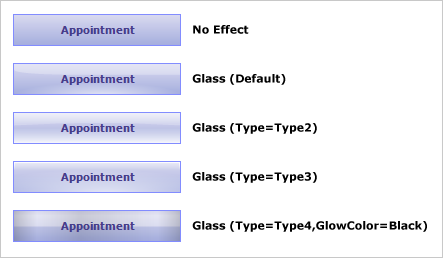
ExampleThe following example demonstrates how to apply glass effect to the items of an existing calendar.
| C#
Copy Code
|
|---|
calendar.ItemEffects.Add(new GlassEffect()); |
| Visual Basic
Copy Code
|
|---|
calendar.ItemEffects.Add(New GlassEffect()) |
Inheritance HierarchySystem.Object
MindFusion.Scheduling.WinForms.ItemEffect
MindFusion.Scheduling.WinForms.GlassEffect
See Also