


Represents an emboss effect.
Namespace: MindFusion.Diagramming
Assembly: MindFusion.Diagramming
 Syntax
C#
 Copy Code Copy Code
|
|---|
public sealed class EmbossEffect : NodeEffect |
| Visual Basic
Copy Code
|
|---|
Public NotInheritable Class EmbossEffect |
RemarksThis effect can be applied to the nodes in a Diagram by adding an instance of this class to the NodeEffects collection. In addition, this effect will be active only when the Diagram.EffectsProvider property is set to an object implementing the GenerateEmboss method of the IEffectsProvider interface.
The following image illustrates the Emboss effect applied to a rectangular node:
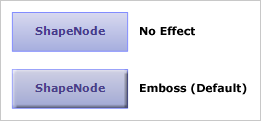
ExampleThe following example demonstrates how to apply emboss effect to the nodes of an existing diagram.
| C#
Copy Code
|
|---|
diagram.NodeEffects.Add(new EmbossEffect()); |
| Visual Basic
Copy Code
|
|---|
diagram.NodeEffects.Add(New EmbossEffect()) |
Inheritance HierarchySystem.Object
MindFusion.Diagramming.NodeEffect
MindFusion.Diagramming.EmbossEffect
See Also