The list below describes recent changes and additions to MindFusion.Diagramming:
New in version 7.2.2
Auto-routing improvements
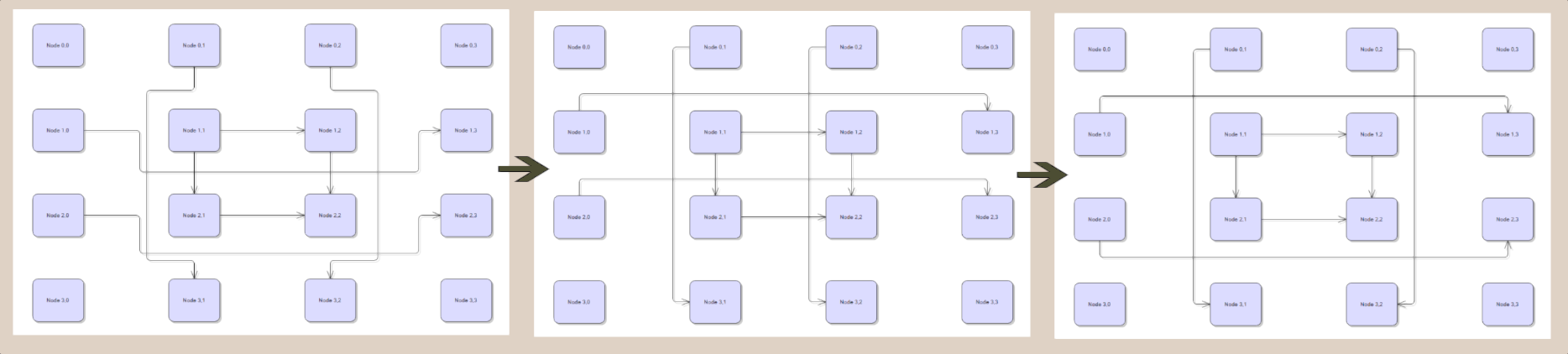
- Enable the MinimizeCrossings property of PatternRouter to make it select routes with fewer crossings. Note that this adds an additional loop to the algorithm, which may affect performance for large diagrams.
- New EvaluateFarPoints property of RoutingOptions, considered by PatternRouter and GridRouter, selects the best route from the possible start/end point combinations of the link's incident nodes. Note that this adds an additional loop to the algorithms, which may affect performance for large diagrams.
- Set the MinLinkSpacing property of CompositeRouter to specify the padding between nearby links.
- This screenshot demonstrates the effects of EvaluateFarPoints and MinimizeCrossings properties:
Custom lasso tools
If you set the Behavior property of DiagramView to DrawLasso, the control lets users draw selection lasso without changing actual Selection. You could use that in conjunction with InitializeLasso and LassoDrawn events to implement custom tools or selection logic, such as:
- Opening a custom context menu or UI panel styled for bulk operations.
- Creating a visual screenshot / export of only the selected region.
- Implementing custom selection logic or filters (e.g. select nodes of a specific type, or select only links).
- Bookmarking the selected area (adding it to Bookmarks).
API changes
New in version 7.2.1
Serialization improvements
- Json element added to SaveToStringFormat enumeration, and can be used with SaveToString and LoadFromString methods.
- For naming consistency with XML serialization methods, JSON methods (SaveToJsonFile, SaveToJsonObject, etc) have been renamed to SaveToJson and LoadFromJson, along with corresponding async versions.
- SaveToJson and LoadFromJson methods added to DiagramView, which also save view state (scroll position and zoom level).
- JSON serialization methods extended to provide full set of Stream overloads.
- XML serialization methods extended to provide full set of Stream overloads (previously missing altogether from DiagramDocument and missing async versions in Diagram).
- AutoDeleteItems now saved in JSON format.
- The Brush of DiagramItem.Pen is now saved in JSON format (fix for hatch pens getting reloaded as solid-color ones).
- LaneGrid cell border styling now saved in JSON format.
- LaneGrid header fonts now saved in JSON format.
- The order of OutgoingLinks and IncomingLinks is now preserved in JSON format.
- Fixed JSON serialization of Tag values of char type.
API changes
New in version 7.2
ItemListView control
ItemListView supersedes
NodeListView and lets you show both nodes and links in the list. Items can be added by calling
AddItem method, and removed by calling
RemoveItem.
DefaultNodeSize property from
NodeListView is called
NewInstanceSize in the new class. The
AutoConnectLinks and
AutoConnectDistance properties control whether links created via drag-and-drop should connect to nearby nodes in the target diagram. For compatibility with legacy code,
NodeListView won't be removed from the library, but it won't be getting any new improvements.
Palette control
The
Palette control represents a tool palette that displays
DiagramItem objects grouped into categories. It implements
Accordion user interface that displays
ItemListView components as its child panels, and category icon, title and collapse/expand button in pane headers. Each child
ItemListView displays the items added to its corresponding category. Call the
AddCategory method to define a category and create its respective accordion pane. Call
AddItem to add an item to specified category. The control can also be populated by adding
PaletteCategory objects to
Palette.Categories collection, and adding items to
PaletteCategory.Items. Palette provides same behavior and appearance properties as the
ItemListView class.
Miscellaneous
- Embed font files in exported PDF documents by setting PdfExporter.EmbedFont predicate.
- To further reduce reliance on BinaryFormatter when persisting binary files, we've added a BinarySerializer interface. Custom implementations should save objects using BinaryWriter and load them using BinaryReader. A BinarySerializer instance can be assigned to PersistContext.BinarySerializer. Its methods are invoked for each non-primitive property of the Control hosted in a ControlNode, and for the Tag and Id properties of DiagramItem.
API changes
- DraggedNode, used to represent drag-and-drop data created by NodeListView, has been renamed to DraggedItem. DraggedItem can also be used in handlers of ItemListView drag-and-drop events.
- DiagramNodeEventArgs used by NodeListView events has been renamed to ListNodeEventArgs.
New in version 7.1.2
API changes
These changes are due to the removal of BinaryFormatter in .NET 10:
- Complex Tag and Id objects (class or struct instances) are now saved using System.Xml.Serialization.XmlSerializer when saving a diagram to XML. SerializeTag and DeserializeTag still allow you to implement custom serialization. You can continue to serialize tags in binary format by setting the UseXmlSerializer property of XmlOptions to false (and adding the System.Runtime.Serialization.Formatters NuGet package to .NET 10 projects).
- Complex Tag and Id objects (class or struct instances) are now saved using System.Text.Json.JsonSerializer when saving a diagram to JSON. JsonSerializeTag and JsonDeserializeTag still allow you to implement custom serialization.
- Clipboard data is now saved in XML format by default. You can revert to the binary format by setting XmlClipboard to false (e.g. if using custom DiagramItem types that only implement binary serialization).
New in version 7.1.1
- Improved padding in BPMN shapes' geometries.
- Visio2013Exporter improvements.
- Fix for items remaining in spatial index if calling some APIs from deleted events.
- PagedContainerNode fixes.
- Fix for GridRouter not updating spatial index.
New in version 7.1
Paged containers
PagedContainerNode is a ContainerNode subclass that organizes its child nodes into a collection of pages, represented by ContainerPage objects. This allows for the creation of more orgainzed diagrams where nodes can be grouped into logical views within a single container. Only the nodes belonging to the currently active page, specified by CurrentPage property, are rendered and participate in user interactions.
Navigation between pages is handled by scroll arrows in the caption bar, allowing users to cycle through the pages sequentially. For faster access, users can also double-click the container's caption to open an in-place combo box listing available page titles, enabling direct navigation to any page. The node's Caption automatically displays the Title of newly activated ContainerPage.
The appearance of pager arrows can be fully customized by implementing a PageIconRenderer and assigning it to the static PageIconRenderer property of Renderers, allowing for custom drawing logic, images, or SVG icons.
ItemLabel image
New Image property added to ItemLabel lets you display icons along a link's geometry, or add more images to a ShapeNode. If a label contains both Text and Image, their relative position is specified by ImageAlign property (by default the image is placed on left side of text), and distance by ContentPadding. The image is rendered using bitmap's intrinsic size, unless you override it by setting ImageSize property. You can treat label images as clickable icons by handling LinkClicked or NodeClicked events and checking label argument passed to their handlers.
Miscellaneous
- JSON serialization fixes and improvements.
- PatternRouter improvements.
- Improved PdfExporter text export for PDFs rendered in Edge browser.
API changes
Per-node-type behavior classes have been replaced by generic classes with a factory delegate / lambda parameter. E.g. if you were subclassing LinkShapesBehavior, now you'd have to replace base class with LinkNodesBehavior<ShapeNode>. New classes also let you avoid subclassing if you only need to specify the type of nodes drawn by users:
C#
 Copy Code Copy Code
|
|---|
diagramView.CustomBehavior = new LinkNodesBehavior<MyNode>(
diagramView, diagram => new MyNode(diagram)); |


