


Represents a glass-like visual effect.
Namespace: MindFusion.Diagramming
File: NodeEffects.js
 Syntax
JavaScript
 Copy Code Copy Code
|
|---|
// class |
RemarksThis effect can be applied to all nodes in a Diagram by adding GlassEffect instance to the nodeEffects collection, or to individual nodes by adding it to their effects array.
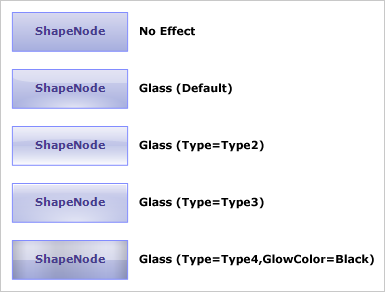
The following image illustrates the Glass effect applied to an item as well as how the different properties affect the output:
ExampleThe following example demonstrates how to apply glass effect to the nodes of an existing diagram.
| JavaScript
Copy Code
|
|---|
| var GlassEffect = MindFusion.Diagramming.GlassEffect; diagram.nodeEffects.push(new GlassEffect()); |
Inheritance HierarchyMindFusion.Diagramming.NodeEffect
MindFusion.Diagramming.GlassEffect
See Also