


Represents an effect that adds semitransparency to the node and emphasizes its outline by adding a shade and an inner stroke.
Namespace: MindFusion.Diagramming
Assembly: MindFusion.Diagramming
 Syntax
C#
 Copy Code Copy Code
|
|---|
public sealed class AeroEffect : NodeEffect |
| Visual Basic
Copy Code
|
|---|
Public NotInheritable Class AeroEffect |
RemarksThis effect can be applied to the nodes in a Diagram by adding an instance of this class to the NodeEffects collection.
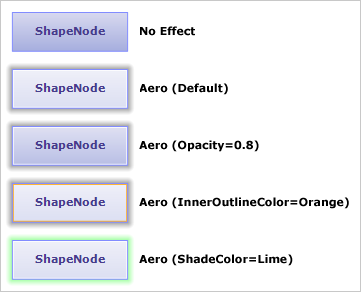
The following image illustrates the Aero effect applied to a rectangular node as well as how the different properties affect the output:
ExampleThe following example demonstrates how to apply aero effect to the nodes of an existing diagram.
| C#
Copy Code
|
|---|
diagram.NodeEffects.Add(new AeroEffect()); |
| Visual Basic
Copy Code
|
|---|
diagram.NodeEffects.Add(New AeroEffect()) |
Inheritance HierarchySystem.Object
MindFusion.Diagramming.NodeEffect
MindFusion.Diagramming.AeroEffect
See Also